
Recordly: Open-Source Screen Recorder and Video Editor
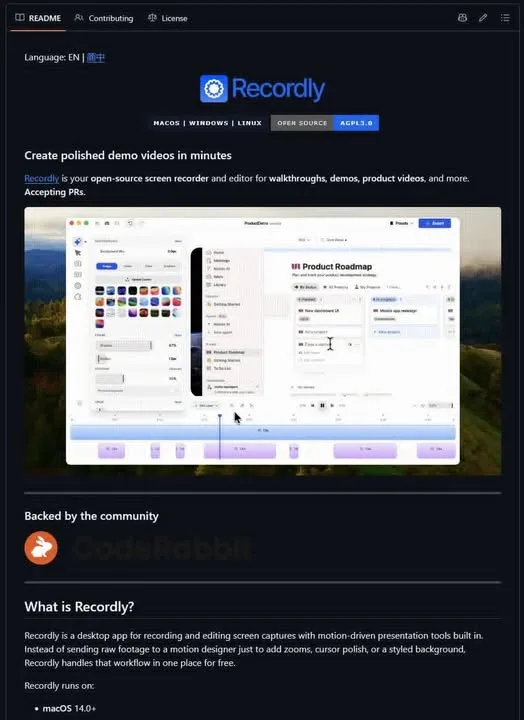
Still recording your tutorial, then opening three other apps to cut and polish it? Recordly is one app that does both. It is an open-source screen recorder and video editor built for tutorials, demos, and product walkthroughs.
The edit happens in the same place as the recording, so you are not exporting a raw clip just to trim it somewhere else.
What Happened
Recordly is an open-source screen recorder and video editor aimed at tutorials, demos, and product walkthroughs. It is licensed under AGPL-3.0 and runs on macOS, Windows, and Linux.
Here is what it ships with:
- Automatic zooms that follow your cursor activity.
- Smooth cursor movement and click effects.
- Webcam bubble overlays.
- Timeline editing, plus speeding up and slowing down any section.
- Text, images, and annotations.
- Frames, backgrounds, blur, shadows, and rounded corners.
- Export to MP4 and GIF.
- ".recordly" project files, so a recording stays editable.
- Community extensions and a marketplace.
Why It Matters
That is normally two jobs and two apps: a screen recorder, then a separate video editor. Recordly folds them together, so a raw screen recording can go straight to a polished demo video without the round trip between programs.
Being open source under AGPL-3.0 means you can read the code and run it on all three desktop platforms. The post does not link a download page, so where you get the build is not stated here.
Does this still work?
Nobody's checked yet
Sign in to tell everyone how it went.
Continue with GoogleBe the first — one tap saves the next person an hour.
It takes 3 reports in 30 days to set the status.
More shares you might like
 ToolsHow to Use Group By in Amazon Associates Reports1d37 views
 ToolsHow to Make Fireworks AI Videos With ChatGPT and Flow1d26 views
 AIAnthropic's AI-Native SDLC Playbook, Explained2d39 views
 NewsTanStack Start 1.0 Is Stable3d51 views
 AIDolphin 2.9.2 Runs Uncensored Llama 3 8B on 6GB VRAM3d40 views
 NewsDeepSeek V4 Pro Is a 1.6T Open-Weight Model With a 1M Context4d62 views
Comments
Join the conversation — sign in to comment.
No comments yet — start the conversation!