About Instagram Unfollowers
Instagram will happily tell you how many people follow you, and it will happily tell you how many people you follow, but it goes quiet the moment you ask which names are in one list and not the other. That gap is why an entire industry of “unfollowers” apps exists — and why most of them ask you to log in with your Instagram username and password first. Handing those over is how accounts get locked, and it's how follower-farms get built. This tool takes the other road: Instagram already lets you download your own followers and following lists as plain files, so you download them, drop them here, and the comparison happens inside your browser tab. There's no account to connect, no session to hijack, and nothing for us to store — because nothing is ever sent to us.
How to use it
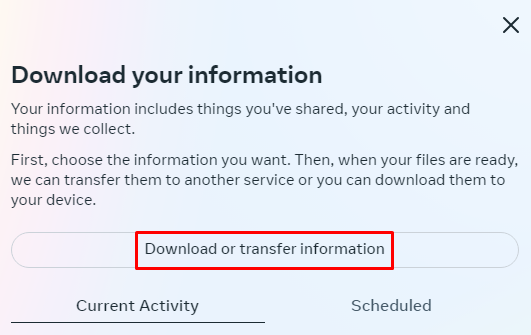
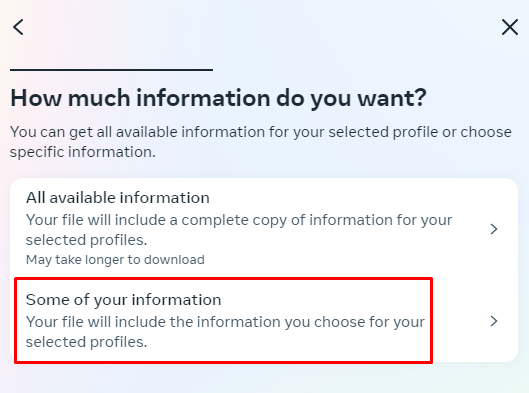
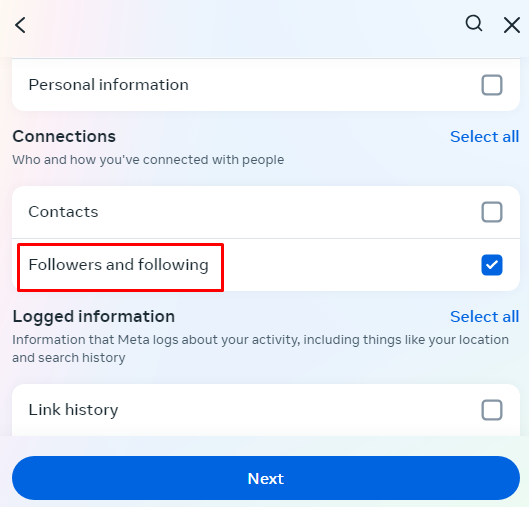
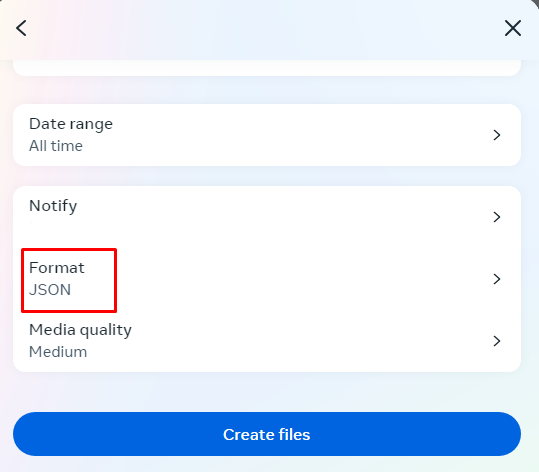
- 1In the Instagram app, go to Settings → Accounts Center → Your information and permissions → Download your information. Choose JSON as the format and tick only “Followers and following”, which keeps the download small and usually ready in minutes rather than days.
- 2Unzip the file Instagram emails you and find followers_1.json and following.json inside the connections folder. Drop one into each box above — they don't have to be in order, and we'll warn you if they're swapped.
- 3Hit “Check non-followers”. The first tab is the answer: everyone you follow who doesn't follow you back. Copy the whole list, or tap any row to open that profile and decide for yourself.
Why use it
FAQ
Do I have to give you my Instagram password?
No, and you shouldn't give it to anyone. This tool only reads the two files Instagram hands you when you request your own data. If a site asks you to log in with your Instagram account to check unfollowers, close it — that's the exact pattern behind most compromised accounts.
How long does the Instagram export take to arrive?
If you request only “Followers and following” in JSON, it's usually ready within a few minutes to an hour. Requesting your entire account history — photos, messages, stories — is what stretches it to days, so keep the selection narrow.
Instagram gave me followers_1.json, followers_2.json, and so on. Which one?
Instagram splits very large follower lists across numbered files. Compare with followers_1.json first, and if your follower count is much higher than the number we read, your list is split — paste the extra files' handles into “Paste lists” mode to combine them.
Does this include people who requested to follow me?
No. Pending follow requests live in a separate file in the export (pending_follow_requests.json) and are deliberately left out — they aren't followers yet, and counting them would make your “not following back” list look wrong.
Can I use it without waiting for the export?
Yes. Switch to “Paste lists” and paste usernames one per line from wherever you have them — a spreadsheet, an older export, or a list you copied by hand. Plain names, @names and full profile links all work.
Is anything uploaded or saved?
Nothing. The files are read with your browser's own file reader and compared in memory. Close the tab and the lists are gone — we never receive them, so there's nothing on our side to leak or sell.
