
How to Make Wildlife Reels With ChatGPT and Google Flow
Hunting for a fast way to fill your Reels feed with wildlife footage? You do not need a camera or a plane ticket. This share walks you through building a vertical animal clip with ChatGPT and Google Flow, from a written prompt to a finished video.
The whole job is one prompt, one rewrite, and one generate. Set the clip to 10 or 15 seconds in 9:16 and it drops straight into Facebook Pro, Instagram Reels, or Shorts.
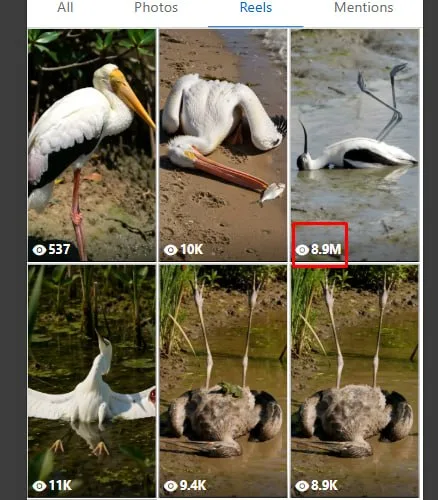
Tutorial
- Set up ChatGPT and Google Flow before you start. ChatGPT is where you rework the prompt, and Google Flow is where the clip gets generated.
- Copy the video prompt into ChatGPT and ask it to modify the prompt. The starting prompt is at https://web.facebook.com/impreneurid/posts/pfbid02nznBVRkPyFexSgVf3uZ7SBC6r18h45Y2o9XuwP8ENsqiFaNu9gGHnqZAwVdhFVGnl
- Open Google Flow and start a New Project.
- Choose the 9:16 format, then pick 10s or 15s for the clip length.
- Paste the modified prompt into the prompt field and hit Generate.
Wrapping Up
You now have a vertical wildlife clip sized for Reels on Facebook Pro, Instagram, and Shorts, built from a prompt you can reuse. Change the animal or the scene in the prompt, run it through ChatGPT again, and generate the next one. The 10-second and 15-second options cover most of what those feeds want.
Does this still work?
Nobody's checked yet
Sign in to tell everyone how it went.
Continue with GoogleBe the first — one tap saves the next person an hour.
It takes 3 reports in 30 days to set the status.
More shares you might like
 NewsAmazon Associates Tracking IDs: What They Are For1d23 views
 AIHarness Tweaks Change Agent Cost 2.6x, Accuracy Barely Moves1d48 views
 ToolsHow to Claim Your ChatGPT Business Hub Profile2d38 views
 ToolsHow to Sign Up for the Amazon Influencers Program3d42 views
 ToolsHow to Make a Ghostly Abandoned Village Video With AI4d72 views
 ToolsHow to Make Motion Graphics Videos With Claude6d80 views

Comments
Join the conversation — sign in to comment.
No comments yet — start the conversation!