
How to Reinstall a VPS OS with One Command
Tired of your current VPS OS? You can wipe it and install a fresh one with a single script.
It supports Ubuntu 20.04 through 24.04, Debian 11 and 12, Kali, and Windows Server 2016 through 2025. Heads up: the reinstall erases every file on the server, so back up anything you need before you run it.
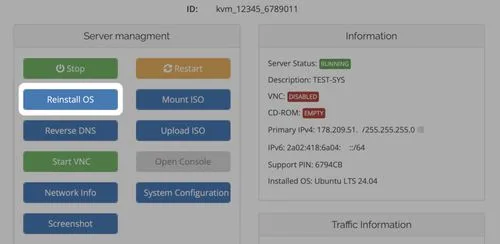
Tutorial
- Run the reinstall command for the Ubuntu version you want. The script downloads itself, makes itself executable, and starts the install.
```bash
# Ubuntu 20.04
wget https://raw.githubusercontent.com/bin456789/reinstall/main/reinstall.sh -O reinstall.sh && chmod +x reinstall.sh && bash reinstall.sh ubuntu 20.04
# Ubuntu 22.04
wget https://raw.githubusercontent.com/bin456789/reinstall/main/reinstall.sh -O reinstall.sh && chmod +x reinstall.sh && bash reinstall.sh ubuntu 22.04
# Ubuntu 24.04
wget https://raw.githubusercontent.com/bin456789/reinstall/main/reinstall.sh -O reinstall.sh && chmod +x reinstall.sh && bash reinstall.sh ubuntu 24.04
```
- Run the matching reinstall command for Debian 11 or 12.
```bash
# Debian 11
wget https://raw.githubusercontent.com/bin456789/reinstall/main/reinstall.sh -O reinstall.sh && chmod +x reinstall.sh && bash reinstall.sh debian 11
# Debian 12
wget https://raw.githubusercontent.com/bin456789/reinstall/main/reinstall.sh -O reinstall.sh && chmod +x reinstall.sh && bash reinstall.sh debian 12
```
- Run this reinstall command for Kali Linux.
```bash
wget https://raw.githubusercontent.com/bin456789/reinstall/main/reinstall.sh -O reinstall.sh && chmod +x reinstall.sh && bash reinstall.sh kali
```
- Run the reinstall command for Windows Server 2025, 2022, or 2016.
```bash
# Windows Server 2025
wget https://raw.githubusercontent.com/bin456789/reinstall/main/reinstall.sh -O reinstall.sh && chmod +x reinstall.sh && bash reinstall.sh windows \
--image-name "Windows Server 2025 SERVERDATACENTER" \
--rdp-port "22"
# Windows Server 2022
wget https://raw.githubusercontent.com/bin456789/reinstall/main/reinstall.sh -O reinstall.sh && chmod +x reinstall.sh && bash reinstall.sh windows \
--image-name "Windows Server 2022 SERVERDATACENTER" \
--rdp-port "22"
# Windows Server 2016
wget https://raw.githubusercontent.com/bin456789/reinstall/main/reinstall.sh -O reinstall.sh && chmod +x reinstall.sh && bash reinstall.sh windows \
--image-name "Windows Server 2016 SERVERDATACENTER" \
--rdp-port "22"
```
- Open the README for all other OS options. It lists every reinstall option.
Wrapping Up
You now have a one-command way to reinstall any of these operating systems on your VPS. Just make sure to back up your data first, because the script wipes the entire disk. Pick the command for the OS you want, run it, and let the script do the rest.
Does this still work?
Nobody's checked yet
Sign in to tell everyone how it went.
Continue with GoogleBe the first — one tap saves the next person an hour.
It takes 3 reports in 30 days to set the status.
More shares you might like
 ToolsHow to Use Group By in Amazon Associates Reports1d37 views
 ToolsHow to Make Fireworks AI Videos With ChatGPT and Flow1d26 views
 AIAnthropic's AI-Native SDLC Playbook, Explained2d39 views
 NewsTanStack Start 1.0 Is Stable3d51 views
 AIDolphin 2.9.2 Runs Uncensored Llama 3 8B on 6GB VRAM3d40 views
 NewsDeepSeek V4 Pro Is a 1.6T Open-Weight Model With a 1M Context4d62 views
Comments
Join the conversation — sign in to comment.
No comments yet — start the conversation!