
How to Get 424 Cinematic Techniques for AI Video
Got a shot in your head that your AI video tool keeps getting wrong? A library of 424 cinematic techniques is built for exactly that gap. It is a browsing library, not a course, so you can jump straight to the term you are missing.
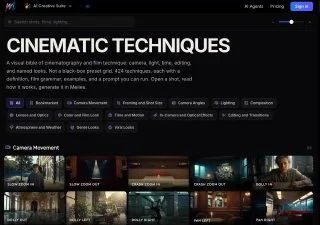
Seven areas are covered: camera movement, camera angles, composition, lighting, color grading, transitions, and visual film and genre. Each technique comes with a plain explanation, its effect on directing, usage notes, an example video, and a prompt you can copy as-is.
What You Need
- A rough visual idea of the shot you want.
Tutorial
- Open https://melies.co/cinematic-techniques.
- Pick the category you need. The library splits into camera movement, camera angles, composition, lighting, color grading, transitions, and visual film and genre.
- Open the technique you want to learn.
- Read the explanation and check the example video. Each entry also shows what the technique does for your directing and where people usually use it.
- Copy the ready-made prompt and use it in your AI video tool.
Wrapping Up
You now have 424 named techniques to reach for instead of describing a look in your own vague words. The next time a clip comes out flat, open the library, find the camera angle or lighting term you actually meant, and paste its prompt. The library is most useful when you already know roughly what you want and just need the vocabulary for it.
Does this still work?
Nobody's checked yet
Sign in to tell everyone how it went.
Continue with GoogleBe the first — one tap saves the next person an hour.
It takes 3 reports in 30 days to set the status.
More shares you might like
 ToolsHow to Use Group By in Amazon Associates Reports19h25 views
 ToolsHow to Make Fireworks AI Videos With ChatGPT and Flow19h16 views
 AIAnthropic's AI-Native SDLC Playbook, Explained2d33 views
 NewsTanStack Start 1.0 Is Stable3d43 views
 AIDolphin 2.9.2 Runs Uncensored Llama 3 8B on 6GB VRAM3d36 views
 NewsDeepSeek V4 Pro Is a 1.6T Open-Weight Model With a 1M Context3d50 views
Comments
Join the conversation — sign in to comment.
No comments yet — start the conversation!