
How to Build AI Photo Prompts With Slash Commands
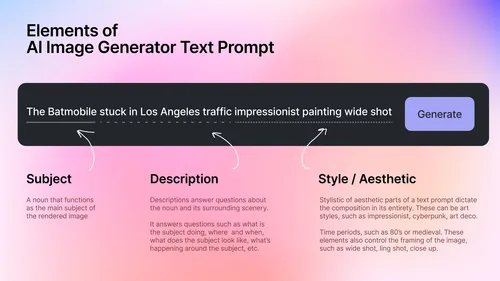
Staring at an empty prompt box again? This share is a set of slash commands you can chain together to steer camera angle, lens, framing and style without writing a whole paragraph.
Each tag does exactly one job, so you can swap a single word and come out with a different shot instead of starting the prompt over.
Tutorial
- Start your prompt with a subject tag like /hannaPremium. The tags all sit on one line, each starting with a slash and separated by spaces.
- Choose how much of the subject fills the frame with a shot tag like /fullbody or /mediumshot. /closeup focuses on the face, while a full body shot shows the subject head to toe.
- Pick the camera angle with /lowangle or /birdseye. A low angle points up from a low position for a dramatic look, and /eyelevel keeps the camera level with the subject's eyes.
- Set the lens with /35mmlens, /50mmlens or /85mmlens. The 35mm tag gives a natural documentary feel, and 85mm is the classic portrait look.
- Add a composition tag such as /cinematiccomposition or /ruleofthirds. /negativeSpace leaves empty room for text, and /leadinglines uses the surroundings to pull the eye toward your subject.
- Finish the look with a style tag like /professionalportrait or /photorealistic. /documentaryphotography keeps it realistic, while /luxuryphotography pushes it premium.
- Close with an output tag like /superhd, the last command in the example prompt. The list runs from angles and lenses through framing, camera movement and composition.
Wrapping Up
You now have a working order to follow: subject, shot, angle, lens, composition, style, output. Change one tag and the same prompt gives you a new photo, so it is worth saving the combos that land well. Try a few angles side by side and see which one fits the scene you have in mind.
Does this still work?
Nobody's checked yet
Sign in to tell everyone how it went.
Continue with GoogleBe the first — one tap saves the next person an hour.
It takes 3 reports in 30 days to set the status.
More shares you might like
 AIHow to Get Free Unlimited GPT-6.1 Sol API Access4h15 views
 AIHow to Get $20 of Free Perch AI Credits Monthly1d40 views
 AIEarshot v0.3 Ships 201 Code-Generated Sound Effects2d48 views
 AIHow to Make Trampoline AI Videos for Instagram Reels2d36 views
 ToolsHow to Get 12 Months of Adobe Express Premium Free3d47 views
 ToolsHow to Use Group By in Amazon Associates Reports4d59 views
Comments
Join the conversation — sign in to comment.
No comments yet — start the conversation!