
How to Get Free Local Voice Cloning With VoiceStudio
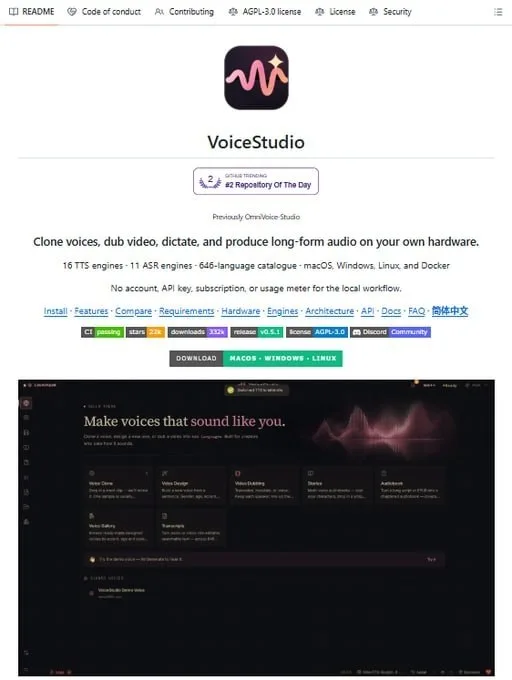
Looking for an ElevenLabs alternative that does not bill you every month? VoiceStudio runs on your own computer, so your voice never leaves the machine. No cloud, no subscription, no upload.
You get voice cloning from a short audio clip, 600+ languages, dubbing for video and YouTube, transcription and audiobook creation, plus an OpenAI-compatible API and an MCP server. It works on Windows, macOS, and Linux.
What You Need
- A computer running Windows, macOS, or Linux.
Tutorial
- Open https://voicestudio.sh/.
- Download the version for Windows, macOS, or Linux. The same tool runs on all three, so grab the one that matches your machine.
- Start VoiceStudio and clone a voice from a short audio clip. Voice design lets you set gender, age, accent, tone, and emotion to shape how it sounds.
- Dub a video from YouTube, transcribe a recording, or build an audiobook from a text file. All of it is processed locally on your device, so nothing gets sent to a server.
Wrapping Up
You now have a voice studio that runs offline and costs nothing, on whichever of the three systems you use. If you write code, point your app at the OpenAI-compatible API or the MCP server and drive the same voices programmatically.
Does this still work?
Nobody's checked yet
Sign in to tell everyone how it went.
Continue with GoogleBe the first — one tap saves the next person an hour.
It takes 3 reports in 30 days to set the status.
More shares you might like
 ToolsHow to Get 12 Months of Adobe Express Premium Free36m2 views
 ToolsHow to Use Group By in Amazon Associates Reports1d38 views
 ToolsHow to Make Fireworks AI Videos With ChatGPT and Flow1d27 views
 AIAnthropic's AI-Native SDLC Playbook, Explained3d41 views
 NewsTanStack Start 1.0 Is Stable4d51 views
 AIDolphin 2.9.2 Runs Uncensored Llama 3 8B on 6GB VRAM4d40 views
Comments
Join the conversation — sign in to comment.
No comments yet — start the conversation!