
How to Get 5 Free AI Models in Cline
Looking for a coding assistant that will not drain your budget? Cline is an open-source AI coding agent, and five of the models inside it are free to use right now.
Five models sit in the free tier, and you can reach Cline from your editor, your terminal, or your browser. One thing to keep in mind: the free lineup can change at any time.
Tutorial
- Open https://cline.bot/ Cline is an open-source AI coding agent, so you can work with it from your editor, your terminal, or the browser.
- Log in or create an account.
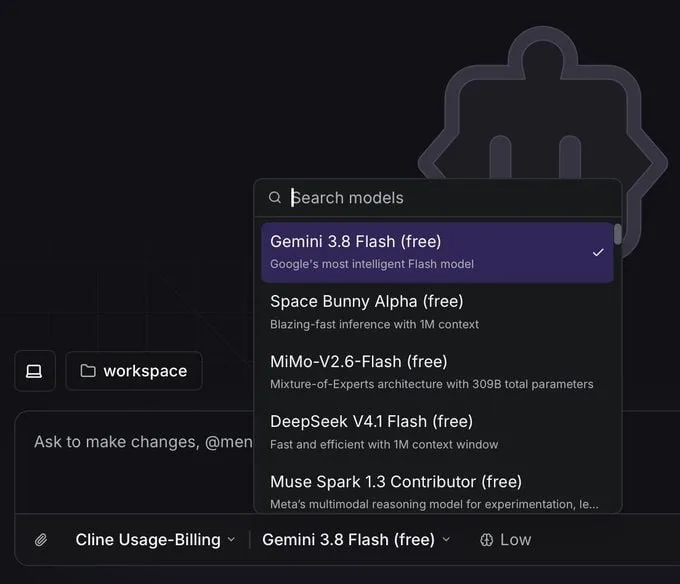
- Open the Model Selector. It is where the available models are listed, and the free ones are marked.
- Pick a model marked Free. The five listed are Gemini 3.8 Flash, Space Bunny Alpha, MiMo-V2.6-Flash, DeepSeek V4.1 Flash, and Muse Spark 1.3 Contributor.
- Start using the model. From there Cline runs the way you set it up, in the editor, the terminal, or the browser.
Wrapping Up
You now have five free models to work with inside an open-source coding agent, and no reason to hold back on trying them. Open a project, switch models when one feels slow, and see which one fits how you write code. Just check the Model Selector before you get attached to any of them, because Cline can change which models are free whenever it wants.
Does this still work?
Nobody's checked yet
Sign in to tell everyone how it went.
Continue with GoogleBe the first — one tap saves the next person an hour.
It takes 3 reports in 30 days to set the status.
More shares you might like
 NewsNVIDIA Open-Sources Auto Ontology, a Semantic Layer for AI Agents3h16 views
 ToolsHow to Write Specs Coding Agents Can Build Without Guessing1d28 views
 AIParallel's Decisions API Grounds Decision Models With Live Web Search2d42 views
 How to Claim 1B Muse AI Tokens2d71 views
 ToolsHow to Use Rich Clicker Macro's Smart Auto Clicker3d44 views
 AIHow to Install hyperresearch for Deep Research in Claude Code5d58 views
Comments
Join the conversation — sign in to comment.
No comments yet — start the conversation!