
How to Get 389 Claude Opus 5.5 Video Prompts
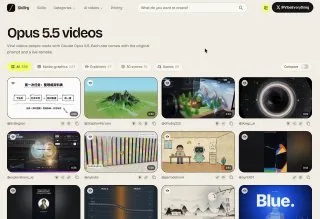
Stuck on what to make with AI video? There is a library of 389 example videos built with Claude Opus 5.5, and every one of them comes with the prompt that made it.
You can watch both the original clip and a remake, copy the prompt, then remix it with your own logo, colors and style. The whole library is free to browse at one link.
Tutorial
- Open https://skillry.dev/ai-videos/opus-5-5. The library is one long collection, so give it a scroll rather than expecting a search box.
- Pick a video that fits what you are working on. The examples cover motion graphics, explainers, 3D scenes, short demos, and marketing and design content.
- View the original and the remake side by side. Seeing what changed between the two tells you which parts of the prompt drove the look.
- Copy the prompt for that video.
- Paste it into Claude Opus 5.5.
- Change the details to match your own project. Swap in your logo, your colors and your style, then run it.
Wrapping Up
The library is a shortcut past the blank page: pick a clip close to what you want, take its prompt, and tune it instead of writing one from scratch. It is built for reference hunting and prompt experiments, so treat the 389 examples as starting points rather than finished work. Open the link, grab one prompt, and see what comes out.
Does this still work?
Nobody's checked yet
Sign in to tell everyone how it went.
Continue with GoogleBe the first — one tap saves the next person an hour.
It takes 3 reports in 30 days to set the status.
More shares you might like
 ToolsHow to Get 12 Months of Adobe Express Premium Free6h11 views
 ToolsHow to Use Group By in Amazon Associates Reports1d38 views
 ToolsHow to Make Fireworks AI Videos With ChatGPT and Flow1d28 views
 AIAnthropic's AI-Native SDLC Playbook, Explained3d42 views
 NewsTanStack Start 1.0 Is Stable4d52 views
 AIDolphin 2.9.2 Runs Uncensored Llama 3 8B on 6GB VRAM4d42 views
Comments
Join the conversation — sign in to comment.
No comments yet — start the conversation!