
Alex RuiezExpert
How to Generate Free Videos with VEO 3.1 and Omni
Want to generate AI videos with Google's VEO 3.1 or Omni model without paying? Google Vids is a free tool that works right from your Gmail account.
You can create and edit videos, and even use motion control — all for free.
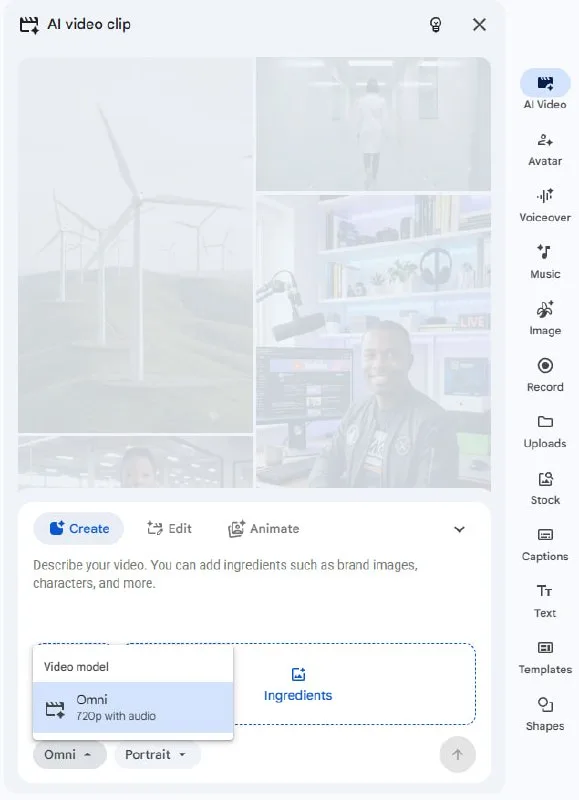
Tutorial
- Sign in to your Gmail account.
- Open Google Vids at https://docs.google.com/videos/.
- Click AI Video.
- Click Create and pick VEO 3.1 or Omni.
- Enter your prompt and hit Generate.
Wrapping Up
You now have a free way to make AI videos with two powerful models. Open Google Vids, pick your model, and start generating. Motion control is there when you need it.
Does this still work?
Nobody's checked yet
Sign in to tell everyone how it went.
Continue with GoogleBe the first — one tap saves the next person an hour.
It takes 3 reports in 30 days to set the status.
More shares you might like
 ToolsHow to Get 12 Months of Adobe Express Premium Free36m2 views
 ToolsHow to Use Group By in Amazon Associates Reports1d38 views
 ToolsHow to Make Fireworks AI Videos With ChatGPT and Flow1d27 views
 AIAnthropic's AI-Native SDLC Playbook, Explained3d41 views
 NewsTanStack Start 1.0 Is Stable4d51 views
 AIDolphin 2.9.2 Runs Uncensored Llama 3 8B on 6GB VRAM4d40 views
Comments
Join the conversation — sign in to comment.
No comments yet — start the conversation!