
Alex RuiezExpert
How to Create a List on Benable
Looking to make your Benable profile look polished? The trick is building lists that people immediately understand.
A specific theme, at least 15 recommendations, and a personal note on each one are what get your list marked Optimized.
Tutorial
- Open Benable and go to your Profile.
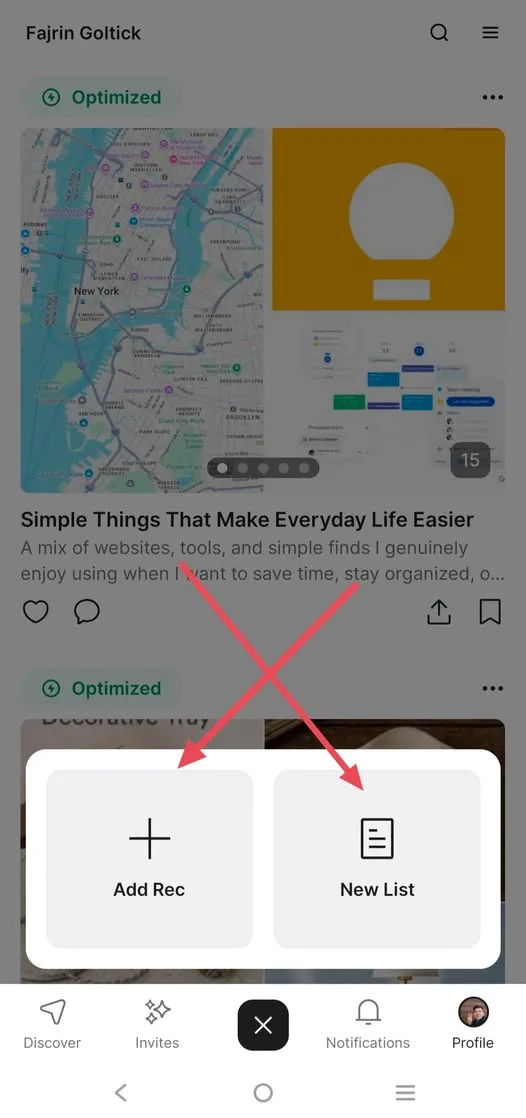
- Tap the plus button at the bottom of the screen.
- Choose New List.
- Enter a specific list name. Try something like Desk Accessories That Make Working More Comfortable.
- Write a description that explains the list naturally. Make it clear what someone will find inside.
- Add at least 15 recommendations that all fit the same theme.
- On each recommendation, use Add Note to write a short reason for your pick.
- Pick a cover that matches the list theme.
- Save and check Tune-up until the status says Optimized.
Wrapping Up
Now your profile has a list that's specific, personal, and optimized. The formula is simple: a specific theme, 15 recommendations, personal notes, and a natural description. Use the same approach for your other lists and your profile will look a lot cleaner.
Does this still work?
Nobody's checked yet
Sign in to tell everyone how it went.
Continue with GoogleBe the first — one tap saves the next person an hour.
It takes 3 reports in 30 days to set the status.
More shares you might like
 ToolsHow to Get 12 Months of Adobe Express Premium Free31m2 views
 ToolsHow to Use Group By in Amazon Associates Reports1d38 views
 ToolsHow to Make Fireworks AI Videos With ChatGPT and Flow1d27 views
 AIAnthropic's AI-Native SDLC Playbook, Explained3d41 views
 NewsTanStack Start 1.0 Is Stable4d51 views
 AIDolphin 2.9.2 Runs Uncensored Llama 3 8B on 6GB VRAM4d40 views
Comments
Join the conversation — sign in to comment.
No comments yet — start the conversation!