
Alex RuiezExpert
How to Choose the Right Local Face-Swap Model
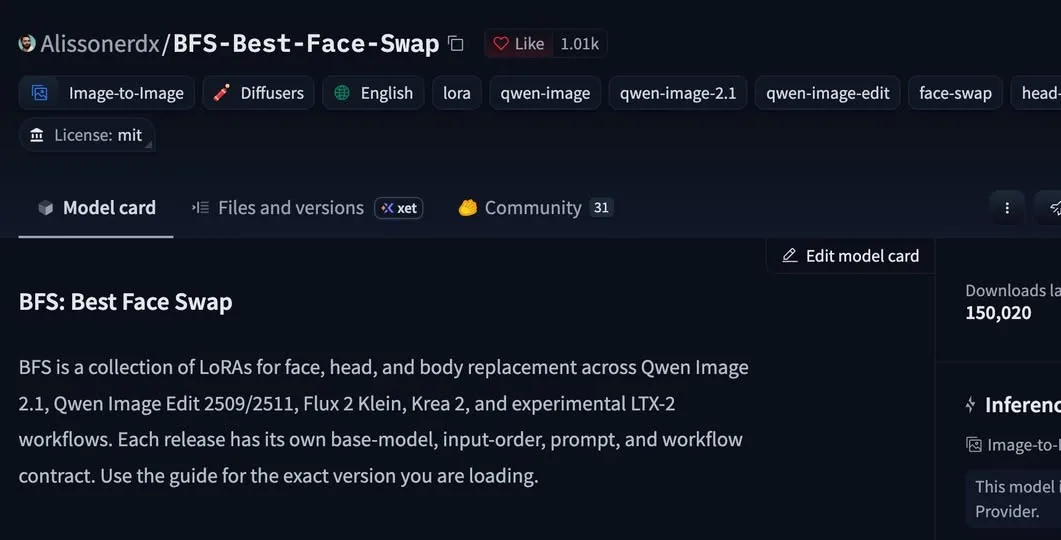
Running face swaps on your own machine comes down to two decisions: which model you load, and whether the face or the body goes first. This share walks through the lineup and the order each model wants.
The models cover image and video, and they handle face, head, hair and body swaps. There is also a known fix for skin that comes out looking plastic.
Tutorial
- Pick the model you want to run. The lineup covers Face V1, Head V1–V2, Head V3–V5, Qwen Image 2.1, Qwen Edit 2509 / 2511, Flux 2 Klein 4B and 9B, Krea 2, and the experimental LTX-2 video model.
- Run the face swap first if you chose Face V1 or Head V1–V2. These families want face first, body second.
- Run the body swap first if you chose Head V3–V5 or Qwen Image 2.1. For these, the order flips: body first, face second.
- Load V1.1 on Qwen 2.1 if V1 made skin look plastic. It keeps pores and freckles without a full retrain.
Wrapping Up
That is the whole call: pick your model, then match the order to it. If a swap comes out with skin that looks plastic, switching to V1.1 on Qwen 2.1 brings the pores and freckles back without a full retrain.
Does this still work?
Nobody's checked yet
Sign in to tell everyone how it went.
Continue with GoogleBe the first — one tap saves the next person an hour.
It takes 3 reports in 30 days to set the status.
More shares you might like
 AIHow to Get Free Unlimited GPT-6.1 Sol API Access8h17 views
 AIHow to Get $20 of Free Perch AI Credits Monthly1d41 views
 AIEarshot v0.3 Ships 201 Code-Generated Sound Effects2d48 views
 AIHow to Make Trampoline AI Videos for Instagram Reels2d37 views
 ToolsHow to Get 12 Months of Adobe Express Premium Free3d47 views
 ToolsHow to Use Group By in Amazon Associates Reports4d60 views
Comments
Join the conversation — sign in to comment.
No comments yet — start the conversation!