
ACI.dev Connects AI Agents to 600+ Tools
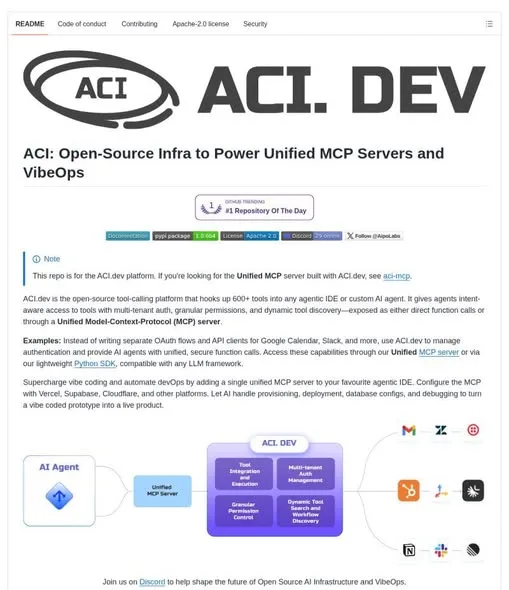
Connecting an AI agent to your whole SaaS stack usually means building a separate OAuth flow and API client for every service. ACI.dev is an open-source tool-calling platform that wants to take that work off your plate.
It connects to more than 600 pre-built integrations and handles authentication for you, so your agent can call those tools through direct functions or one unified MCP server.
What Happened
ACI.dev is released under the Apache 2.0 license and works with agentic IDEs and custom AI agents.
- 600+ integrations for popular services and applications, ready to plug in.
- A unified MCP server or a lightweight SDK for direct function calling.
- Multi-tenant OAuth flows and secrets management for developers and end users.
- Natural-language permission boundaries and dynamic tool discovery to keep agents reliable.
- Tool-use logging so teams can inspect every agent call and the issues it hit.
Why It Matters
Instead of stitching together separate API clients, you get one platform that manages auth and exposes every tool consistently. The permission boundaries and logging also give you a clearer picture of what your agent is actually doing. If you are building agents that touch multiple SaaS tools, this is a solid base to build on.
Does this still work?
Nobody's checked yet
Sign in to tell everyone how it went.
Continue with GoogleBe the first — one tap saves the next person an hour.
It takes 3 reports in 30 days to set the status.
More shares you might like
 ToolsHow to Use Group By in Amazon Associates Reports1d37 views
 ToolsHow to Make Fireworks AI Videos With ChatGPT and Flow1d26 views
 AIAnthropic's AI-Native SDLC Playbook, Explained2d39 views
 NewsTanStack Start 1.0 Is Stable3d51 views
 AIDolphin 2.9.2 Runs Uncensored Llama 3 8B on 6GB VRAM3d40 views
 NewsDeepSeek V4 Pro Is a 1.6T Open-Weight Model With a 1M Context4d62 views
Comments
Join the conversation — sign in to comment.
No comments yet — start the conversation!