
Shaders Brings Drop-In WebGPU Effects to Five Front-Ends
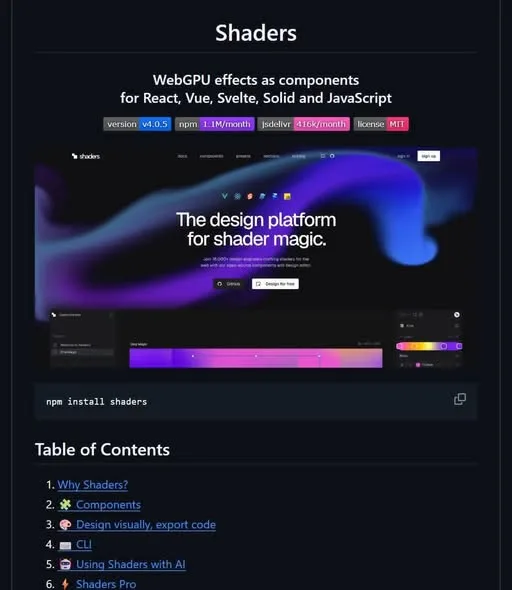
Adding WebGPU effects to a page usually means writing the shaders yourself. Shaders skips that part, handing you the effects as components you drop straight into your site. A visual editor handles the tweaking and exports the code when you like what you see.
That last part is the useful bit. You are not locked into somebody else's effect file, because the editor gives you code you can keep and change.
What Happened
Shaders is a library of WebGPU effects that you drop into your site as components. Instead of hand-writing an effect, you open it in a visual editor, adjust it there, and export the code. It works in React, Vue, Svelte, Solid and plain JavaScript.
Why It Matters
Most effect libraries pick a side. They either tie you to one framework, or they hand you a bundle you can't open up afterwards. Shaders lists five targets, four frameworks plus plain JavaScript, so a member on an older or simpler stack is not shut out.
The export is the other half of the deal. You adjust the effect visually, then walk away with the code itself rather than a dependency you can only use as-is.
Wrapping Up
If you build front-ends and have ever wanted a visual effect on a page without writing shader code first, this is one to keep in mind. The visual editor plus code export is the part worth remembering, since it lets you start from something you can see and finish with something you own.
More shares you might like
 Newsn8n Labs Ships Nod, an Open-Source Agent for Small Chores16h22 views
 NewsClaude BugHunter Packs 83 Security Skills for AI Agents1d38 views
 ToolsHow to Make Wildlife Reels With ChatGPT and Google Flow3d52 views
 NewsAmazon Associates Tracking IDs: What They Are For4d50 views
 AIHarness Tweaks Change Agent Cost 2.6x, Accuracy Barely Moves4d77 views
 ToolsHow to Claim Your ChatGPT Business Hub Profile5d63 views



Comments
Join the conversation — sign in to comment.
No comments yet — start the conversation!