
How to Find Products to Recommend on Amazon Influencer
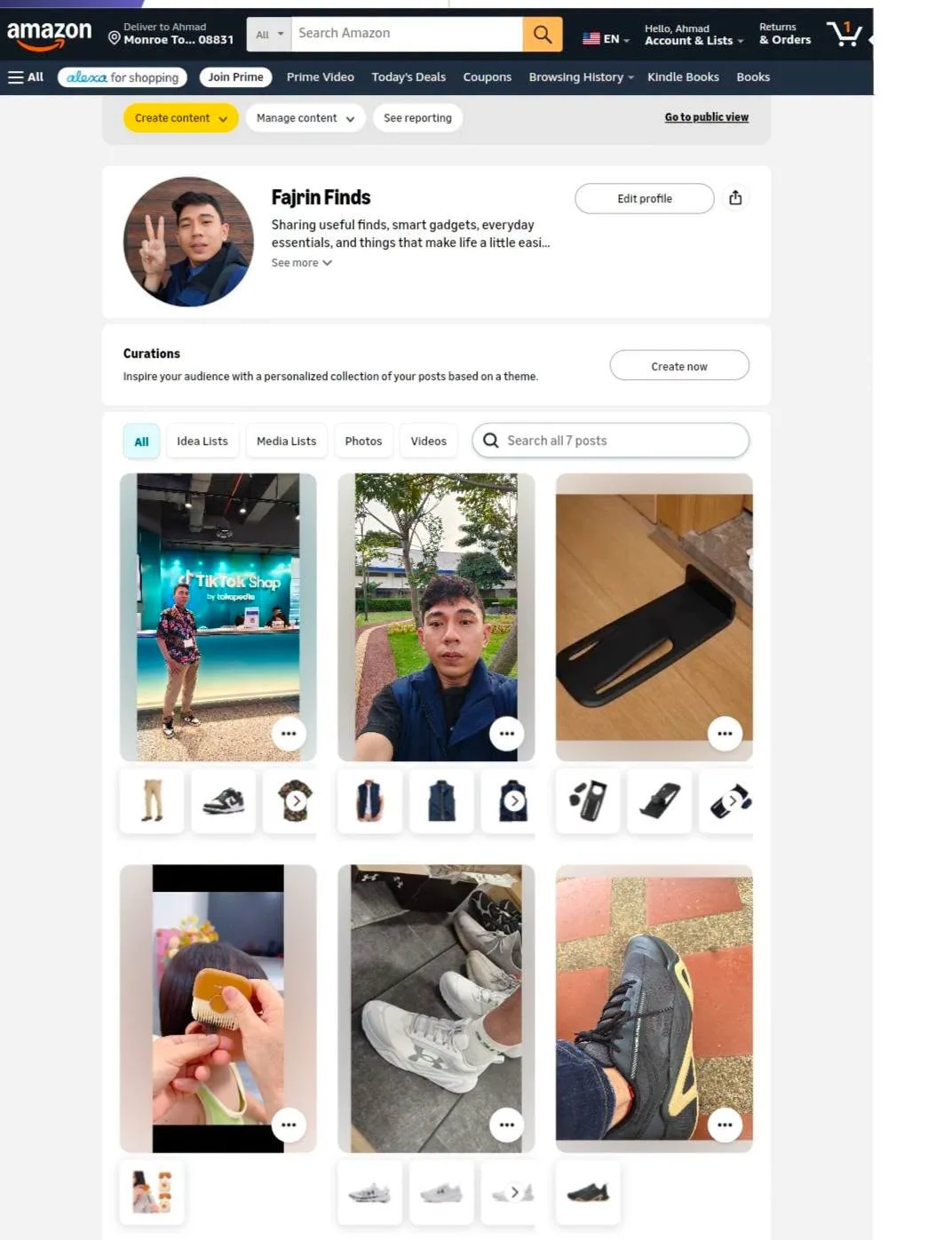
Just joined Amazon Influencer and not sure how to start picking products? You may not need to hunt through the catalog one item at a time: upload a photo you already have, and Amazon will point out the products in it for you.
That turns pictures sitting in your phone's gallery into a possible new way to earn through Amazon Influencer. You still get the final say on every product before anything goes public.
What You Need
- An Amazon Influencer account, even a brand-new one.
Tutorial
- Upload your own original content, including a photo of yourself showing a product. It does not have to be a polished studio shot, so a normal outfit photo works.
- Let Amazon read the photo and suggest relevant products. It picks out the items it recognizes and lines them up as recommendations you can look through.
- Check the detected products before you publish anything. Go through the list and make sure the items it flagged actually match what your content shows.
- Explore the feature before you rely on it. Run a few of your own photos through it so you get a feel for what Amazon detects and what it misses.
Wrapping Up
You now have a way to start from content you already made instead of an empty product search. Upload a photo, look over what Amazon suggests, and publish only the picks you would actually recommend. Learn it slowly, keep posting, and let the feature do the first pass for you.
Does this still work?
Nobody's checked yet
Sign in to tell everyone how it went.
Continue with GoogleBe the first — one tap saves the next person an hour.
It takes 3 reports in 30 days to set the status.
More shares you might like
 AIAI Agents Test Your Mobile App on 20 Devices at Once20h26 views
 AIGoogle's SynthCorp Builds Fresh Benchmarks for Data Agents1d35 views
 AIHow to Get ML.AI Infinite Free for One Month2d93 views
 ToolsHow to Reverse-Engineer a Competitor's Marketing With REM3d61 views
 AIHow to Get 12 Months of Free ChatGPT for Researchers4d101 views
 ToolsHow to Join the Amazon Influencer Program6d61 views


Comments
Join the conversation — sign in to comment.
No comments yet — start the conversation!