
How to Use the Free Prompts.chat Prompt Library
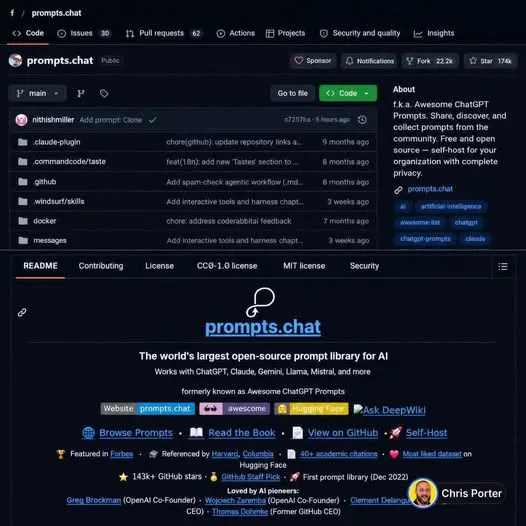
Still writing every prompt from scratch? A community library with more than 174,000 GitHub stars already has a lot of that work done for you. It is free, open source, and works with the AI tools you already have open.
There is no subscription and no paid tier. The prompts are released under a public-domain dedication, so you can adapt them in your own projects without starting from zero.
Tutorial
- Open the Prompts.chat repository on GitHub. It is the project with more than 174,000 stars, and the prompts inside are free to use.
- Browse the community prompt library. Pick the ones that match what you are building instead of writing each prompt yourself.
- Copy a prompt into ChatGPT, Claude, Gemini, or another AI tool. Then change the wording so it fits your own project.
- Plug the prompts into your workflow with the CLI, the MCP server, or the Claude Code plugin. Those let you pull prompts in without copy-pasting each one by hand.
- Export prompts to CSV to build your own collection. You end up with a set you can sort, trim, and reuse later.
- Self-host it with your own branding and authentication. Do this if you want the library to feel like part of your own tool rather than someone else's site.
Wrapping Up
You now have a free prompt library you can browse, copy from, wire into your workflow, or run yourself. Because the prompts are dedicated to the public domain, adapting them is allowed, so start with the ones closest to your project and edit from there. No subscription is involved at any point.
Does this still work?
Nobody's checked yet
Sign in to tell everyone how it went.
Continue with GoogleBe the first — one tap saves the next person an hour.
It takes 3 reports in 30 days to set the status.
More shares you might like
 NewsOctober's Security Roundup: 15 Breaches and Backdoors1d18 views
 ToolsHow to Install Official Hermes Agent Plugins2d26 views
 ToolsHow to Get Free Netflix With Gopay NEXT3d29 views
 AIHow to Get Antigravity Ultra Free for 6 Months4d42 views
 ToolsHow to Get a Free Month of Super Duolingo4d42 views
 ToolsHow to Claim a Free .BOND or .CYOU Domain5d61 views
Comments
Join the conversation — sign in to comment.
No comments yet — start the conversation!