
How to Set Up Rich Translate for Offline Translation
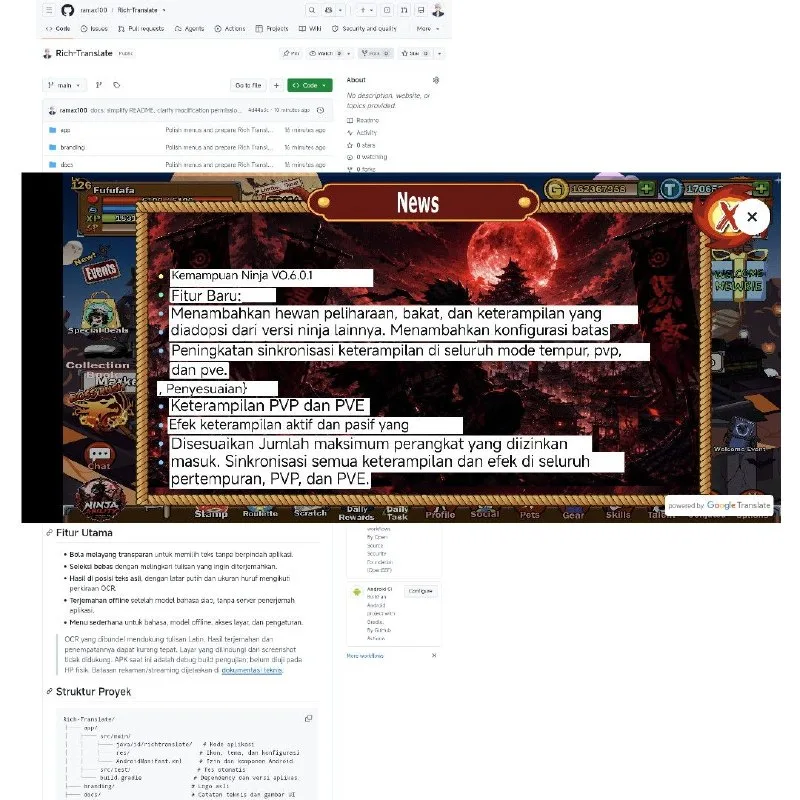
Hunting for a translator that keeps working when the internet doesn't? Rich Translate floats on top of whatever app you're in and translates any text you circle, without sending it anywhere.
The catch is right on the label: it runs on Google's free ML Kit engine, so the output sits a step below the real Google Translate app. Setup is short, but Android makes you disable a protection first.
What You Need
- An Android phone with Play Protect and Accessibility settings — both are part of the setup.
Tutorial
- Turn off Play Protect before you install anything. The app uses a newer Keystone package that Play Protect doesn't recognize, so it will block the install otherwise.
- Install the app from the open-source project at https://github.com/ramax100/Rich-Translate.
- Open the app and pick your language, then download the resource it asks for. That download is what lets it translate offline later.
- Follow the app's steps to turn on Accessibility. Just work through the prompts it shows until the permission is active.
- Tap the floating button, then circle any text on screen you want translated. That is the whole workflow — no copying, no switching apps.
Wrapping Up
You now have a translator that runs on the phone itself, called up by a floating button over any screen. Keep your expectations honest: it is built on Google's free ML Kit model, so the phrasing is rougher than the real Google Translate. For quick on-the-fly reading it does the job; for anything that matters, double-check the result.
Does this still work?
Nobody's checked yet
Sign in to tell everyone how it went.
Continue with GoogleBe the first — one tap saves the next person an hour.
It takes 3 reports in 30 days to set the status.
More shares you might like
 ToolsHow to Make ASMR Carpet Cleaning Videos With AI1d20 views
 NewsExo Lets Agents Edit Their Own Harness Mid-Task3d45 views
 ToolsHow to Make Amazon Influencer Review Videos4d56 views
 NewsVideo Bank vs. Original Video for Amazon Affiliate5d61 views
 ToolsHow to Get a Free 1-Year .MY.ID Domain6d71 views
 ToolsHow to Pass Shopee Affiliate Content Verification1w72 views

Comments
Join the conversation — sign in to comment.
No comments yet — start the conversation!