
Oya Browser Puts One API in Front of Every Browser Agent
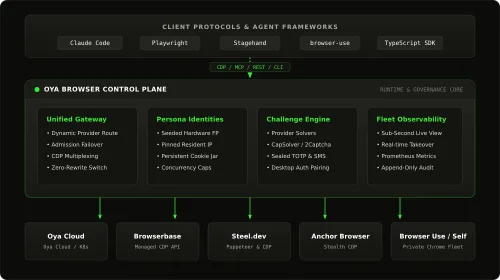
Running more than one browser agent usually means juggling a different API for every provider. Oya Browser is a control plane that sits between your agents and the browsers they drive, so you wire it up once and swap out the infrastructure underneath whenever you want.
Instead of going agent to provider and hoping the connection holds, you get agent to Oya to whatever browser setup you actually need.
What Happened
Oya Browser connects a single API to several browser providers: Oya Cloud, Browserbase, Steel, Anchor, Browser Use, or your own Chrome.
On top of that connection layer, it adds four things:
- Playbooks, which turn a workflow that worked into a reusable automation.
- Repair Drafts, which generate a fix when an agent breaks, test it, then ship it.
- Human Takeover, for CAPTCHA, MFA, or the moments an agent genuinely needs a person.
- Persistent Personas, which keep fingerprints, cookies, and proxies across sessions.
Licensing is split. The SDK and CLI are MIT, while the repository itself uses the Sustainable Use License. The project is on GitHub.
Why It Matters
For repetitive loops like open website, log in, fill stuff, extract data, repeat, the browser layer is where runs quietly fall apart. Keeping one interface means you can move a workflow to a different provider without rewriting the agent around it, and the repair, takeover, and persona features cover the spots that usually end a session early. It is worth watching if you are stacking up browser agents and tired of gluing providers together by hand.
Does this still work?
Nobody's checked yet
Sign in to tell everyone how it went.
Continue with GoogleBe the first — one tap saves the next person an hour.
It takes 3 reports in 30 days to set the status.
More shares you might like
 AIHow to Install hyperresearch for Deep Research in Claude Code7h13 views
 ToolsHow to Set Up Free Temp Email With XTemp Mail7h15 views
 NewsGrabFood Vermuk Bypass: No Working Termux Script Exists1d26 views
 ToolsHow to Self-Host Apps and Databases With Dokploy1d34 views
 News44 AI Agents Ran a Hacking Campaign Against Japan2d38 views
 ToolsHow to Claim Free May.id Domains for a Year3d50 views
Comments
Join the conversation — sign in to comment.
No comments yet — start the conversation!