
Alex RuiezExpert
How to Send TikTok Stickers to WhatsApp
Found a funny sticker in your TikTok DMs and want it on WhatsApp too? A bot can forward it for you once you link the two apps.
The bot is @stickertowabyzelsaddr on TikTok. Setup takes about a minute.
What You Need
- The TikTok app, signed in.
- WhatsApp on the same phone.
- A browser, in case the bot's link won't open inside TikTok.
Tutorial
- Open the @stickertowabyzelsaddr profile, tap Message, and send halo. The bot replies with a
wa.melink that holds your personal code (TT plus 6 digits).
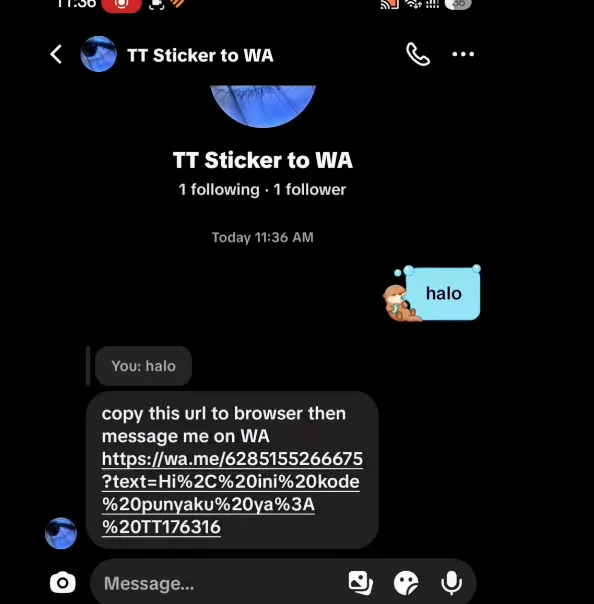
- Tap the link. If it won't open inside TikTok, copy it and paste it into your browser. WhatsApp opens with a message already filled in, like "Hi, ini kode punyaku ya: TT176316".
- Send that message without editing it. The code is what ties your TikTok account to this WhatsApp number.
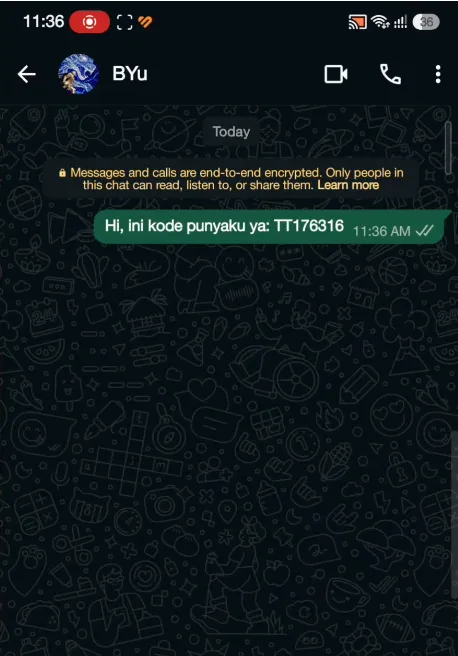
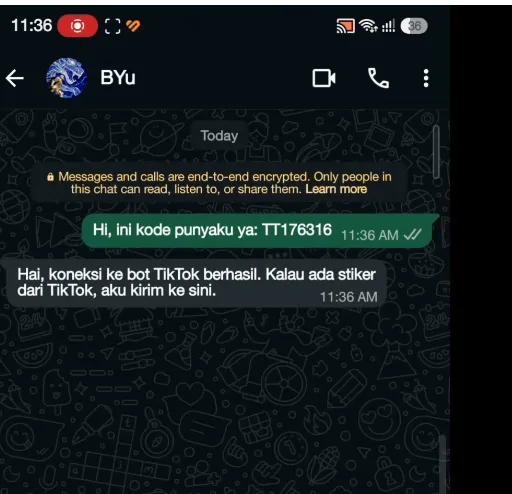
- Wait a few seconds for the reply "Hai, koneksi ke bot TikTok berhasil". That means your accounts are linked.
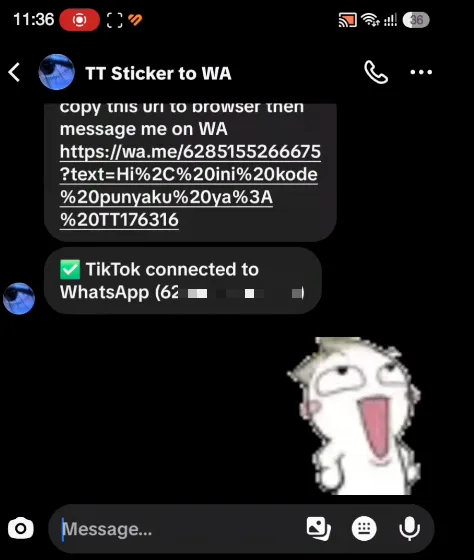
- Go back to the bot's DM on TikTok. You'll see "TikTok connected to WhatsApp". Now send the bot any sticker.
- Open WhatsApp. The sticker is already in your chat with the bot, followed by "Stiker TikTok-nya sudah diteruskan ke sini ya".
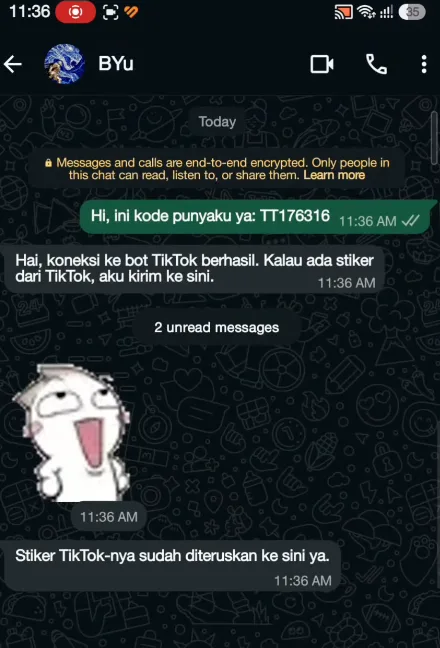
- Tap the sticker and choose Add to Favorites so you can use it in any chat.
If It Doesn't Work
- Link won't open: long-press it, copy it, and paste it into a browser.
- No reply on WhatsApp: check that the code message was sent unchanged. If the bot stays quiet, send halo on TikTok again for a new code.
- Stickers don't arrive: the TikTok DM must show "TikTok connected to WhatsApp". If it doesn't, redo steps 2 and 3.
Wrapping Up
Link once, then every sticker you send the bot on TikTok lands in WhatsApp. Keep in mind the bot can see your WhatsApp number after you link, and only use your own code.
Does this still work?
Nobody's checked yet
Sign in to tell everyone how it went.
Continue with GoogleBe the first — one tap saves the next person an hour.
It takes 3 reports in 30 days to set the status.
More shares you might like
 News44 AI Agents Ran a Hacking Campaign Against Japan10h19 views
 ToolsHow to Claim Free May.id Domains for a Year22h23 views
 AIHow to Get 300 Million Free GLM-5.3-Flash Tokens Daily1d44 views
 NewsShaders Brings Drop-In WebGPU Effects to Five Front-Ends2d34 views
 ToolsHow to Claim 3 Months of Make Pro for Free3d51 views
 Social MediaHow to Use Pinterest to Drive Amazon Affiliate Traffic4d52 views
Comments
Join the conversation — sign in to comment.
No comments yet — start the conversation!