
How to Get 2 XXI Tickets for 23rb With GoPay
Two cinema tickets for 23rb is a hard price to argue with. If you already have GoPay on your phone, the deal is sitting right there waiting for you. One catch: it only works for one film, SITI SI VAMPIR.
The promo covers 2 seats for 23rb, and the voucher is tied to that one title, so it will not show up for anything else playing.
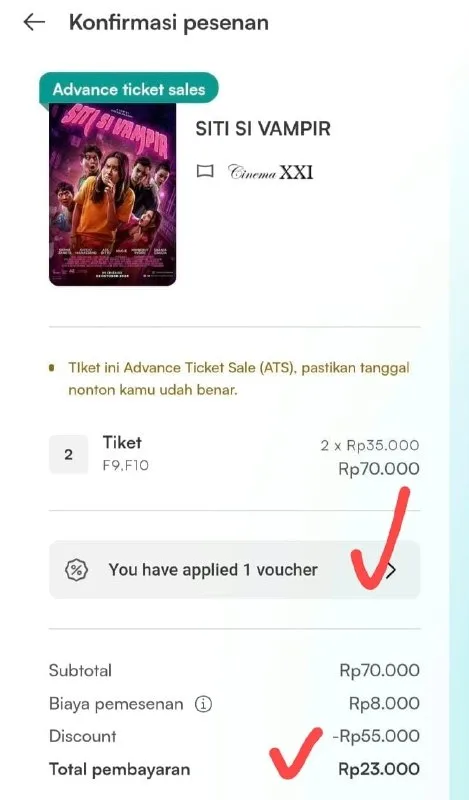
What You Need
- A GoPay account on your phone.
Tutorial
- Open GoPay.
- Scroll down the home screen. The XXI deal is further down the page, not in the top row of shortcuts.
- Find XXI in the list. That is the cinema brand you are looking for, not a specific theater.
- Pick the film SITI SI VAMPIR. The promo only applies to this title.
- Click Select mall. This is where you choose which XXI location you want to watch at.
- Choose 2 seats. That is the number the deal covers.
- Use the voucher. Apply it before you pay, or the discount will not come off the total.
Wrapping Up
That is two seats to SITI SI VAMPIR for 23rb, claimed from inside the app you probably already have open. Because the voucher is locked to that single film, check the title first before you start picking seats at your mall. If SITI SI VAMPIR is not what you want to watch, this deal is not for you.
Does this still work?
Nobody's checked yet
Sign in to tell everyone how it went.
Continue with GoogleBe the first — one tap saves the next person an hour.
It takes 3 reports in 30 days to set the status.
More shares you might like
 ToolsHow to Claim Free May.id Domains for a Year7h16 views
 AIHow to Get 300 Million Free GLM-5.3-Flash Tokens Daily1d34 views
 NewsShaders Brings Drop-In WebGPU Effects to Five Front-Ends1d32 views
 ToolsHow to Claim 3 Months of Make Pro for Free2d49 views
 Social MediaHow to Use Pinterest to Drive Amazon Affiliate Traffic4d50 views
 Newsqm: Y Combinator's Open-Source Agent for Slack Teams4d58 views
Comments
Join the conversation — sign in to comment.
No comments yet — start the conversation!