
How to Earn USD Commissions With Amazon Associates
If you thought affiliate marketing only paid out on local marketplaces, think again. Amazon runs its own affiliate program, Amazon Associates, and it pays commissions in US dollars.
Signing up is free. The part that surprises most people: the shopper does not have to buy the exact product you linked. If the purchase qualifies under Amazon's attribution rules, you can still earn a commission on it.
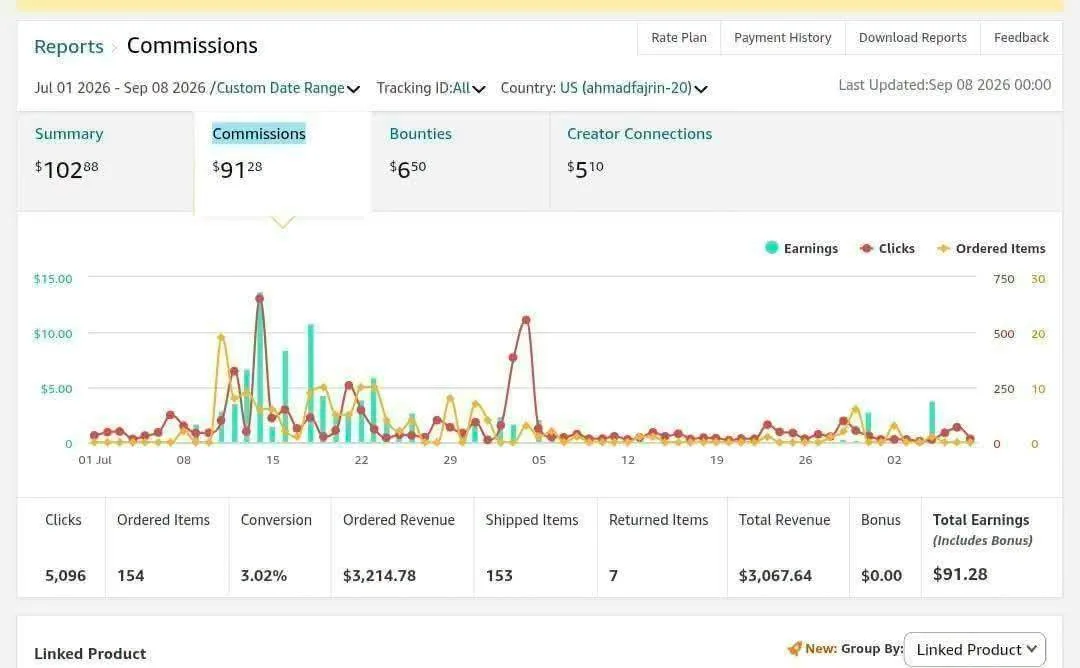
Tutorial
- Open the Amazon Associates website.
- Log in with your Amazon account, or create one if you do not have one yet.
- Add your account details and your promotional channels. Those channels are wherever you plan to post, like social media, a blog, Pinterest, Threads, or YouTube.
- Once you are approved, start creating affiliate links and promoting products. Share them on social media, blogs, Pinterest, Threads, or YouTube, and if someone shops through your link and the purchase qualifies, you earn a commission in USD.
Wrapping Up
There is no cost to join, and the work is mostly sharing links in places where people already shop. Approval is what unlocks link creation, so get your account details and channels filled in properly the first time. Post your first link and see what comes back.
Does this still work?
Nobody's checked yet
Sign in to tell everyone how it went.
Continue with GoogleBe the first — one tap saves the next person an hour.
It takes 3 reports in 30 days to set the status.
More shares you might like
 ToolsHow to Use Rich Clicker Macro's Smart Auto Clicker7h16 views
 AIHow to Install hyperresearch for Deep Research in Claude Code2d34 views
 ToolsHow to Set Up Free Temp Email With XTemp Mail2d43 views
 NewsGrabFood Vermuk Bypass: No Working Termux Script Exists3d41 views
 ToolsHow to Self-Host Apps and Databases With Dokploy3d48 views
 News44 AI Agents Ran a Hacking Campaign Against Japan4d53 views
Comments
Join the conversation — sign in to comment.
No comments yet — start the conversation!