
How to Download Suno Tracks With the sunosaver Bot
Suno tightened its download limits, and that stings when you want to keep copies of your own tracks. There is a small bot called sunosaver that takes a Suno link and hands the file straight back to you.
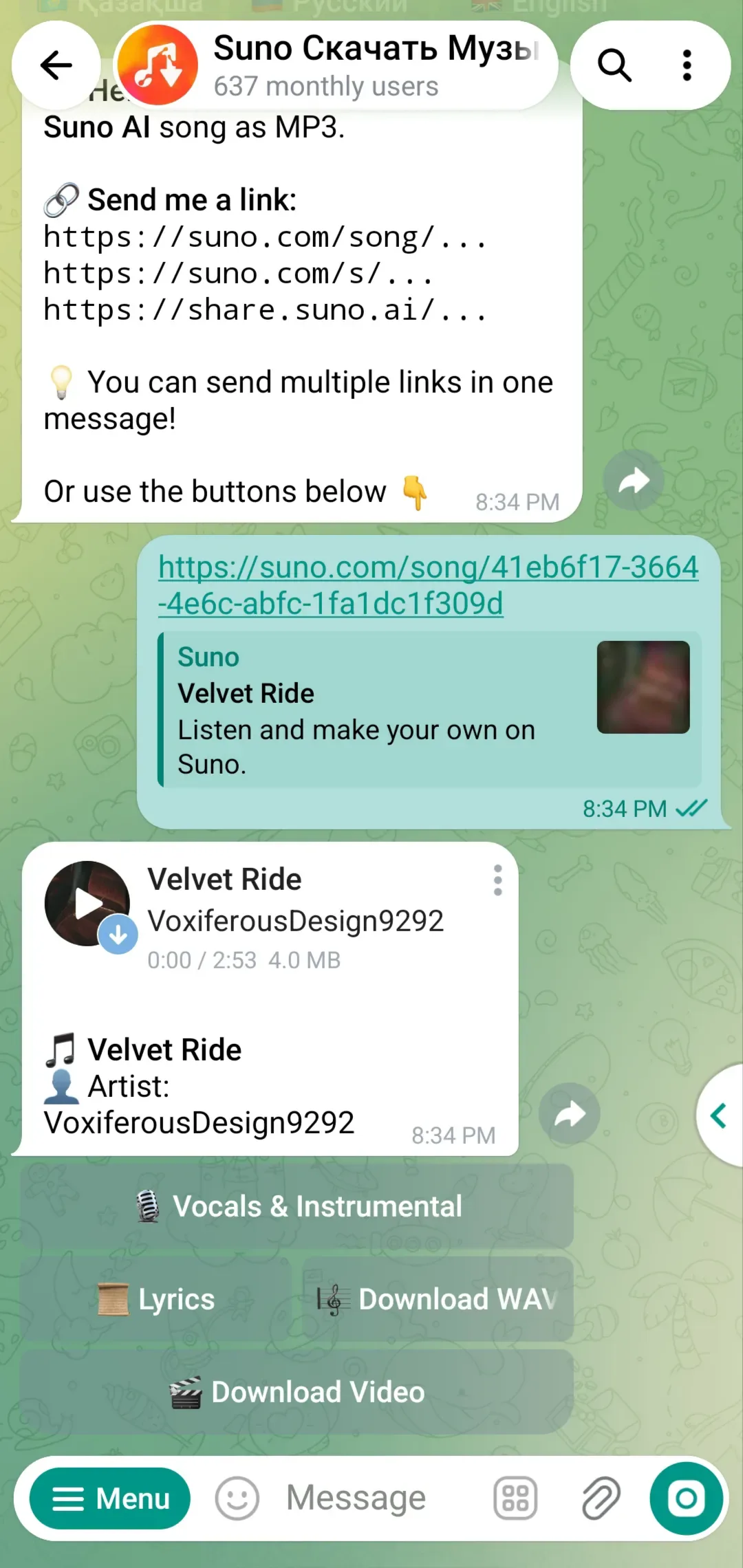
Send it one link and you get the audio as MP3 or WAV, plus the lyrics, cover art and ID3 tags. It also takes multiple links at once, so a batch of tracks does not have to be done one by one.
What You Need
- A Suno account with tracks you want to save.
Tutorial
- Open the sunosaver bot in your chat app.
- Send the bot a Suno link. That one link is all it needs before it gets to work.
- Download the track as MP3 or WAV. Pick whichever format you want to keep.
- Pull the lyrics for the track if you need them.
- Merge up to 10 tracks into a single file.
- Build DJ-style crossfades between tracks.
- Grab the cover art and ID3 tags for the file.
- Send up to 5 links at once. A batch goes through in one message instead of five.
Wrapping Up
You now have a faster way to keep your own Suno tracks, whatever the download limits do. Start with one link you already have, see what comes back, then try a batch of five once you trust it.
The bot does the heavy lifting: audio, lyrics, tags and merges all come back in the same chat.
Does this still work?
Nobody's checked yet
Sign in to tell everyone how it went.
Continue with GoogleBe the first — one tap saves the next person an hour.
It takes 3 reports in 30 days to set the status.
More shares you might like
 News44 AI Agents Ran a Hacking Campaign Against Japan42m7 views
 ToolsHow to Claim Free May.id Domains for a Year12h21 views
 AIHow to Get 300 Million Free GLM-5.3-Flash Tokens Daily1d38 views
 NewsShaders Brings Drop-In WebGPU Effects to Five Front-Ends2d33 views
 ToolsHow to Claim 3 Months of Make Pro for Free3d51 views
 Social MediaHow to Use Pinterest to Drive Amazon Affiliate Traffic4d51 views
Comments
Join the conversation — sign in to comment.
No comments yet — start the conversation!