
How to Claim Free 2TB iCloud Storage on Apple One
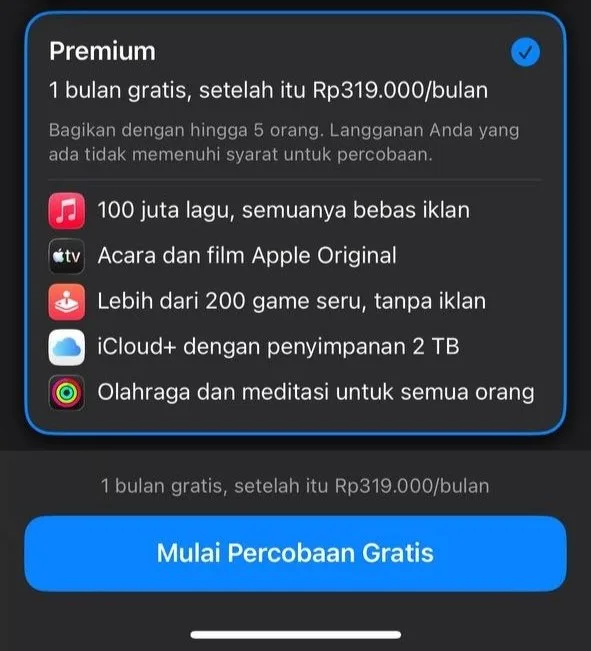
Looking for free iCloud storage? Apple One runs a free trial, and the Premium plan is the one to pick if you want the 2TB of iCloud space this is about. There is no code to redeem and nothing to install — the whole thing happens on Apple's own page.
It costs nothing to start, and you are the one who chooses the plan. Done right, it takes about a minute.
Tutorial
- Open https://www.apple.com/id/apple-one/ in your browser. That address is Apple's own Apple One page, so no third-party site is involved.
- Click the option to try Apple One free. Apple's page shows it as Try Apple One Free.
- Choose the Premium plan from the list of packages. This is the plan the post pairs with the 2TB of iCloud storage, so do not stop on a smaller tier.
Wrapping Up
That is the whole process: two clicks on Apple's page and the Premium plan selected. Once the trial starts, the 2TB of iCloud storage this share is about is attached to your Apple account. Take a moment to read the trial terms on the page so you know when it ends.
Does this still work?
Nobody's checked yet
Sign in to tell everyone how it went.
Continue with GoogleBe the first — one tap saves the next person an hour.
It takes 3 reports in 30 days to set the status.
More shares you might like
 NewsGrabFood Vermuk Bypass: No Working Termux Script Exists17h15 views
 ToolsHow to Self-Host Apps and Databases With Dokploy1d25 views
 News44 AI Agents Ran a Hacking Campaign Against Japan2d32 views
 ToolsHow to Claim Free May.id Domains for a Year2d41 views
 AIHow to Get 300 Million Free GLM-5.3-Flash Tokens Daily3d75 views
 NewsShaders Brings Drop-In WebGPU Effects to Five Front-Ends4d44 views
Comments
Join the conversation — sign in to comment.
No comments yet — start the conversation!