
Brandfetch MCP Gives AI Assistants Brand Data
Hunting down a brand's logo to paste into your AI chat is a small chore that adds up fast. Brandfetch MCP lets your assistant go get that data itself, so the model works from real brand details instead of guessing.
It is built for Claude, Cursor, Windsurf, and Gemini CLI.
What Happened
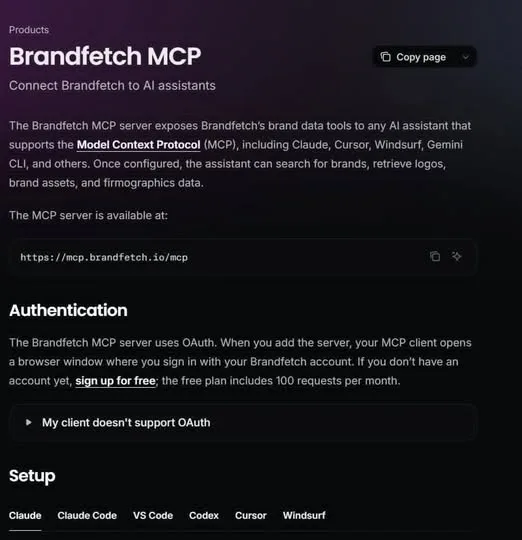
Brandfetch MCP connects AI assistants straight to Brandfetch's brand data. The assistants named as compatible are Claude, Cursor, Windsurf, and Gemini CLI.
Through it, an assistant can do three things: search for brands, grab logos and brand assets, and pull firmographic data.
The link runs over MCP — the Model Context Protocol — which gives AI tools a direct way to interact with an outside service like Brandfetch.
Why It Matters
If you build workflows where the AI needs real brand context instead of guessing, this removes a manual step. Designers, developers, marketers, and AI builders are the people it lands for.
MCP is quietly becoming the glue between AI agents and external tools. A service that already speaks it is one less thing you have to wire up yourself.
The takeaway is simple: your assistant can now look a brand up on its own, and you get that time back.
Does this still work?
Nobody's checked yet
Sign in to tell everyone how it went.
Continue with GoogleBe the first — one tap saves the next person an hour.
It takes 3 reports in 30 days to set the status.
More shares you might like
 AIHow to Get 300 Million Free GLM-5.3-Flash Tokens Daily7h15 views
 NewsShaders Brings Drop-In WebGPU Effects to Five Front-Ends19h20 views
 ToolsHow to Claim 3 Months of Make Pro for Free1d36 views
 Social MediaHow to Use Pinterest to Drive Amazon Affiliate Traffic3d41 views
 Newsqm: Y Combinator's Open-Source Agent for Slack Teams3d50 views
 ToolsHow to Claim a Free IDwebhost Domain for a Year4d115 views
Comments
Join the conversation — sign in to comment.
No comments yet — start the conversation!