How to Make Wooden-Animal Videos with Omni Flash and Seedance
Want to make viral videos of wooden animals without picking up a camera? You can generate the image with AI, animate it with Omni Flash or Seedance, and edit it in CapCut. This share walks you through the full workflow.
The process uses five tools and five steps, so you can go from prompt to published video in a short session.
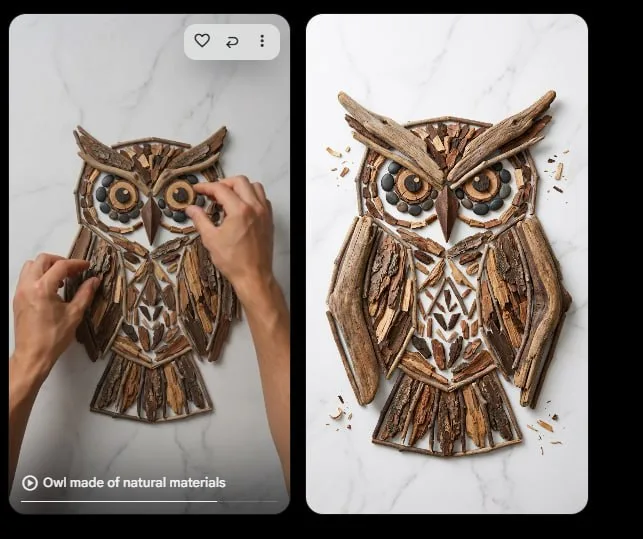
Tutorial
- Set up ChatGPT, Google Flow, and Dola AI.
- Grab the prompt from https://web.facebook.com/impreneurid/posts/pfbid02sr3jHzELwxrhzMYgLJdfoEPKkUMGpBWixVoBvhuQhrw3GhuSBtaUERJ9x7Bega34l. Paste and tweak it in ChatGPT.
- Generate the image first in Nano Banana Pro 2.
- Turn the image into a video with Seedance or Omni Flash.
- Add narration, edit in CapCut, then upload.
Wrapping Up
You now have a simple pipeline for creating wooden animal videos with AI. Start with a prompt from the link, then let each tool do its part. The final edit in CapCut is all that's left before you post.
Does this still work?
Nobody's checked yet
Sign in to tell everyone how it went.
Continue with GoogleBe the first — one tap saves the next person an hour.
It takes 3 reports in 30 days to set the status.
More shares you might like
 AIHow to Get Free $200 Funds on Digital Ocean1y830 views
 AIHow to Claim 100M Free Tokens on CodeCraft API1w506 views
 AIOx Alpha Now Free on 5 Providers4w72 views
 ToolsHow to Explore 6,100+ Y Combinator Startups on One Map1w30 views
 ToolsHow to Pay Claude With SEPA (IBAN) Using Tampermonkey1mo141 views
 ToolsHow to Transfer Files Peer to Peer With Share Rich1w34 views
Comments
Join the conversation — sign in to comment.
No comments yet — start the conversation!