
Alex RuiezExpert
How to Pass Payoneer Account Verification
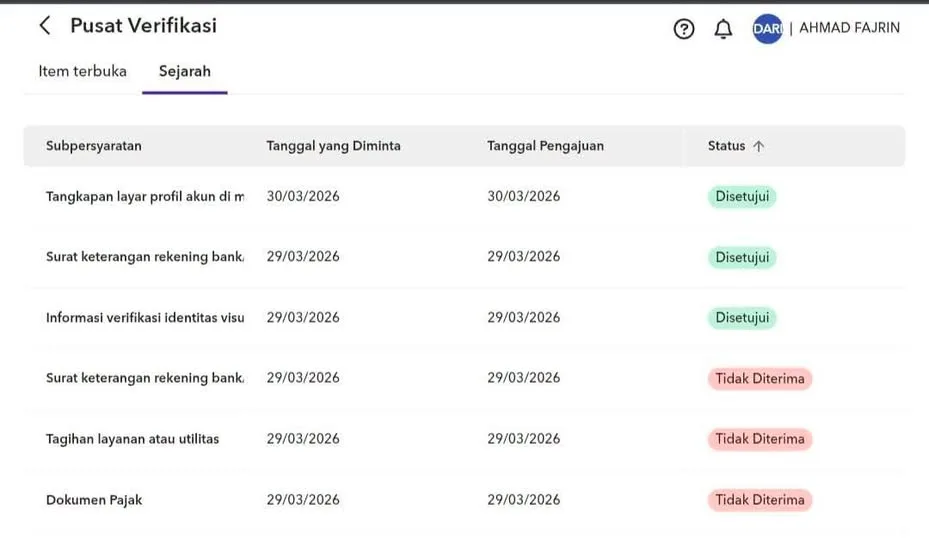
Registering for Payoneer and stuck on the verification screen? One member's review came back mixed, with some documents approved and others rejected.
Here is what went through, and what to do when something comes back marked Not Accepted.
What You Need
- A Payoneer account that is already in the signup or verification stage.
- The identity data you used when you registered.
- A bank statement or bank letter that lists your account details.
Tutorial
- Fill in the identity verification with the same data you used when you signed up. This is the first section Payoneer asks about, and it came back Approved.
- Use a bank statement for the bank account section. In this case a bank letter that listed the account details was enough, and that part was Approved too.
- Read the note Payoneer leaves on any document marked Not Accepted. That note is where it tells you what it actually wanted.
- Prepare a document that matches what Payoneer asked for in that note. The details on it have to line up with the data on your account.
- Submit the document again. Keep your data consistent across every section, and send it only once it matches the request.
Wrapping Up
A rejection is not the end of your application. Check what Payoneer flagged, fix that one document, and send it back in with everything consistent.
Keep your identity details identical everywhere in the form, and let the documents match what was asked for. That is the whole trick, and it is the part most people rush.
Does this still work?
Nobody's checked yet
Sign in to tell everyone how it went.
Continue with GoogleBe the first — one tap saves the next person an hour.
It takes 3 reports in 30 days to set the status.
More shares you might like
 How to Claim 1B Muse AI Tokens5h16 views
 ToolsHow to Use Rich Clicker Macro's Smart Auto Clicker17h19 views
 AIHow to Install hyperresearch for Deep Research in Claude Code2d38 views
 ToolsHow to Set Up Free Temp Email With XTemp Mail2d47 views
 NewsGrabFood Vermuk Bypass: No Working Termux Script Exists3d44 views
 ToolsHow to Self-Host Apps and Databases With Dokploy4d50 views
Comments
Join the conversation — sign in to comment.
No comments yet — start the conversation!