Revesery
Dashboard
Home
Explore
Groups
Jobs
Tools
Rewards
Social Media
VideoBulk VideoProfile PictureSlide ShowSound / AudioUnfollowersDouyin
VideoBulk Video
VideoStoriesBulk VideoProfile PictureSlide ShowUnfollowersStalker CheckSoon
VideoUnfollowersLink Cleaner
MP4 · VideoMP3 · Audio
WhatsApp
Profile PictureCover Art & Preview
Profile Picture
Video & Image
Video & Photo
Utilities
AI Chat
Fake SNBTWatermark KTP
TeraboxVidey
Deep Voice CheckerReview Calculator
Surat IzinFoto Hijau Biru MerahQR GeneratorSoon
Case ConverterCookie Converter
Request a toolImage ToolsSoonText ToolsSoon
Premium
Soon
Add bookmarks
Revesery
HomeExploreGroupsJobsContributors
Most read
↑↓ selectEnter openEsc close/ to search from anywhere
Login
AR
Alex RuiezExpert
@alex · Aug 9, 2026 · 283 views
#Tools

How to Join an Amazon Creator Connections Campaign

Curious how Amazon's Creator Connections actually works? You can browse live brand campaigns, accept one, and start promoting products with your own content.

It all lives inside Amazon Associates, so there is no extra setup. Once a campaign accepts you, you get the product links and a clear place to submit your post.
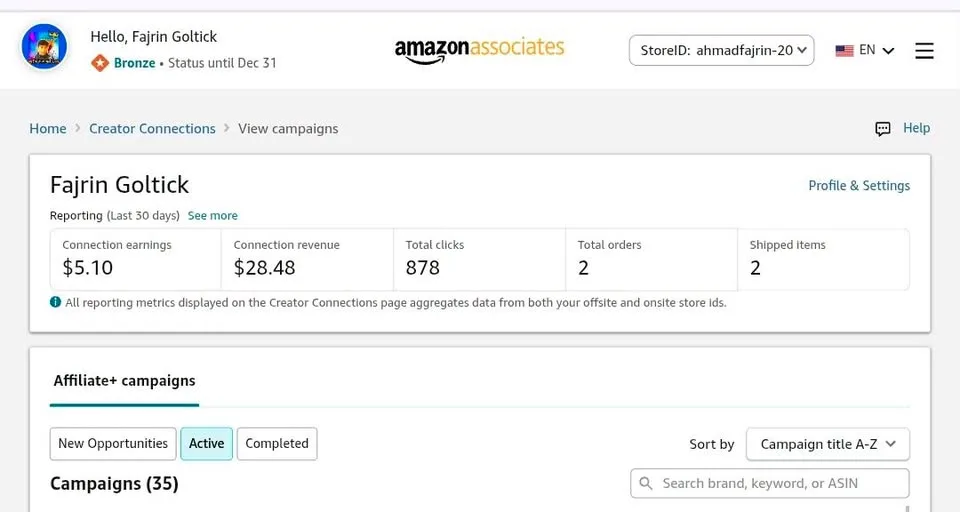
How to Join an Amazon Creator Connections Campaign

Tutorial

  1. Sign in to Amazon Associates.
  2. Open Promotions, then choose Creator Connections.
  3. Browse the available campaigns.
  4. Open a campaign and read its details and content rules.
  5. Click Accept to join the campaign.
  6. Scroll to a product and pick Get Associate Link.
  7. Create a photo or video post and share it on an allowed platform.
  8. Return to Manage Content, choose the Content Type, paste the post URL, and click Submit.

Wrapping Up

That is the whole flow I tried. It suits you best if you already have an Amazon Associates account — nothing extra to install. Take one campaign, follow its content rules, and see how the links perform.

Liked Alex Ruiez's share? Revesery is where people swap what they're actually building.

Join with Google
Be the first to sayBe first

Does this still work?

Nobody's checked yet

Sign in to tell everyone how it went.

Continue with Google

Be the first — one tap saves the next person an hour.

It takes 3 reports in 30 days to set the status.

Comments

Join the conversation — sign in to comment.

Sign In Now

No comments yet — start the conversation!

Read it later?
We'll email you the link to this share. Nothing else.

More shares you might like
ToolsHow to Make Motion Graphics Videos With ClaudeAlex Ruiez · 1d · 33 viewsNewsNVIDIA Open-Sources Auto Ontology, a Semantic Layer for AI AgentsAlex Ruiez · 2d · 46 viewsToolsHow to Write Specs Coding Agents Can Build Without GuessingAlex Ruiez · 3d · 50 viewsAIParallel's Decisions API Grounds Decision Models With Live Web SearchAlex Ruiez · 4d · 55 viewsHow to Claim 1B Muse AI TokensAlex Ruiez · 4d · 103 viewsToolsHow to Use Rich Clicker Macro's Smart Auto ClickerAlex Ruiez · 5d · 59 views

Trending this week

How to Get 2 Years of Google AI Pro Free102 viewsZyLike & LTK Affiliate Marketing18 viewsHow to Claim Free ZRO API Access for Coding Tools184 viewsHow to Make Motion Graphics Videos With Claude33 viewsHow to Claim 1B Muse AI Tokens103 viewsSee more on Explore

Site footer

Revesery

Empowering people to share valuable insights, discover hidden information, and connect with an amazing community of learners and experts.

  • 654Members
  • 806Shares published

Explore

  • Explore shares
  • Top contributors
  • Feedback

Company

  • About us
  • Editorial policy
  • Contact
  • Advertise with us
  • System status
© 2026 Revesery
  • Privacy
  • Terms
  • Trust & Safety
  • DMCA
HomeExploreShareToolsProfile
KAKing Arthur joined Revesery3 hours ago