How to Join an Amazon Creator Connections Campaign
Curious how Amazon's Creator Connections actually works? You can browse live brand campaigns, accept one, and start promoting products with your own content.
It all lives inside Amazon Associates, so there is no extra setup. Once a campaign accepts you, you get the product links and a clear place to submit your post.
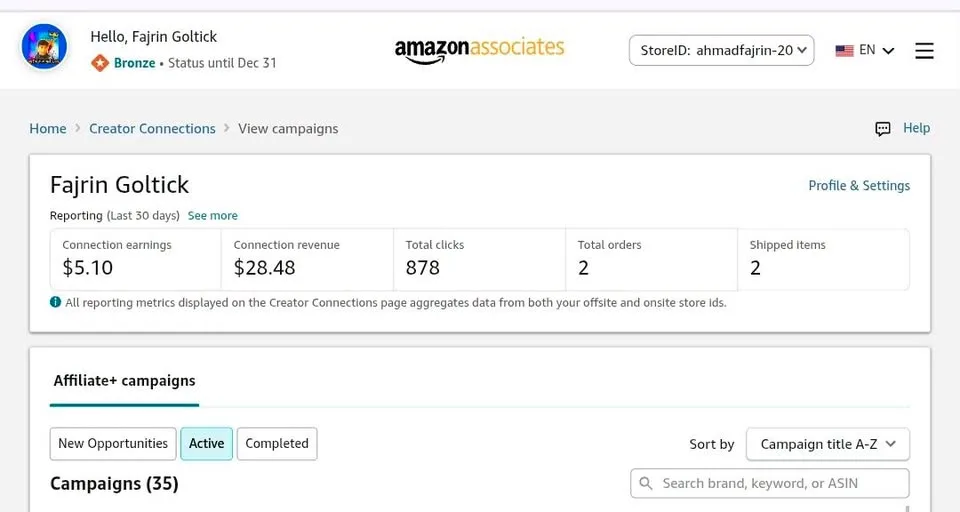
Tutorial
- Sign in to Amazon Associates.
- Open Promotions, then choose Creator Connections.
- Browse the available campaigns.
- Open a campaign and read its details and content rules.
- Click Accept to join the campaign.
- Scroll to a product and pick Get Associate Link.
- Create a photo or video post and share it on an allowed platform.
- Return to Manage Content, choose the Content Type, paste the post URL, and click Submit.
Wrapping Up
That is the whole flow I tried. It suits you best if you already have an Amazon Associates account — nothing extra to install. Take one campaign, follow its content rules, and see how the links perform.
Does this still work?
Nobody's checked yet
Sign in to tell everyone how it went.
Continue with GoogleBe the first — one tap saves the next person an hour.
It takes 3 reports in 30 days to set the status.
More shares you might like
 AIHow to Get Free $200 Funds on Digital Ocean1y818 views
 AIHow to Claim 100M Free Tokens on CodeCraft API1w456 views
 AIHow to Use Ori Harness With Any Model Through OpenRouter1mo92 views
 NewsFree Domain Available at nic.eu.org1mo97 views
 AIHow to Claim a Free Year of Claude for Teachers20h14 views
 AIHow to Use Google Flow for AI Car Unboxing Videos1mo79 views
Comments
Join the conversation — sign in to comment.
No comments yet — start the conversation!