How to Make Rusty Statue Cleaning Videos With Omni Flash
Want to make those satisfying rusty statue cleaning videos everyone is posting on Instagram and TikTok? You can create one in about a minute with Omni Flash and Google Flow, no editing experience needed.
You get a 10-second, 9:16 clip that works on Facebook, Facebook Pro, Instagram, and TikTok.
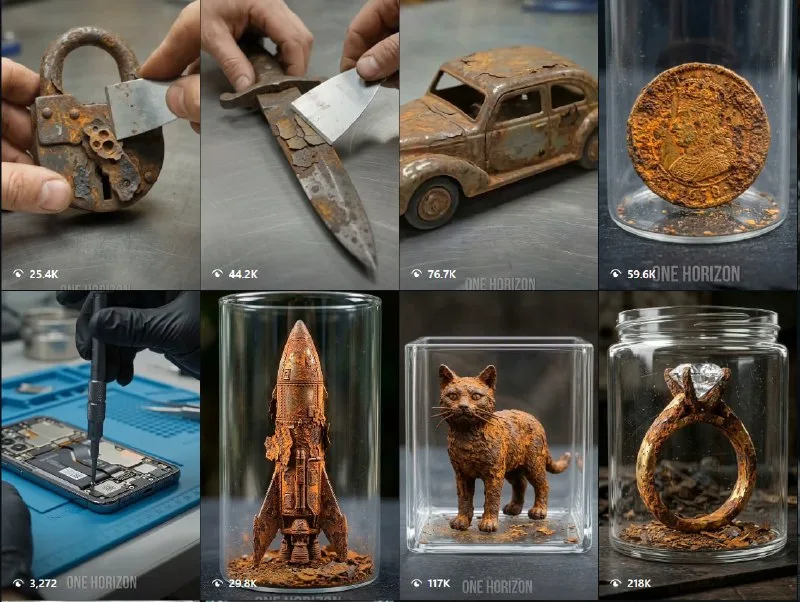
Tutorial
- Open ChatGPT and Google Flow.
- Paste the master prompt from https://web.facebook.com/impreneurid/posts/pfbid02fZnZbx5qZKJoJimpnkRAA1pPYjt8WEwm5puf2JqLUjr8LcFJxUSDJwn8cz6ay1KKl into ChatGPT to modify it.
- Open Google Flow, create a New Project, and open it.
- Select the AI Model, set 10s duration, and choose 9:16.
- Replace [OBJECT] with your subject, paste the prompt into Flow, and click Generate.
Wrapping Up
You now have a 10-second vertical clip ready to post on Facebook, Instagram, or TikTok. Swap [OBJECT] for anything and run it again for a whole batch of videos.
Does this still work?
Nobody's checked yet
Sign in to tell everyone how it went.
Continue with GoogleBe the first — one tap saves the next person an hour.
It takes 3 reports in 30 days to set the status.
More shares you might like
 AIHow to Get Free $200 Funds on Digital Ocean1y842 views
 AIHow to Claim a Free Year of Claude for Teachers1w54 views
 AIHow to Claim 100M Free Tokens on CodeCraft API2w784 views
 AIHow to Claim 1 Billion Free Tokens on Muse AI1w64 views
 ToolsHow to Get Free Manus AI Agent Access1mo103 views
 AIHow to Get a Free Month of Genspark Plus3w205 views
Comments
Join the conversation — sign in to comment.
No comments yet — start the conversation!