How to Claim Free Credits on Four AI Tools
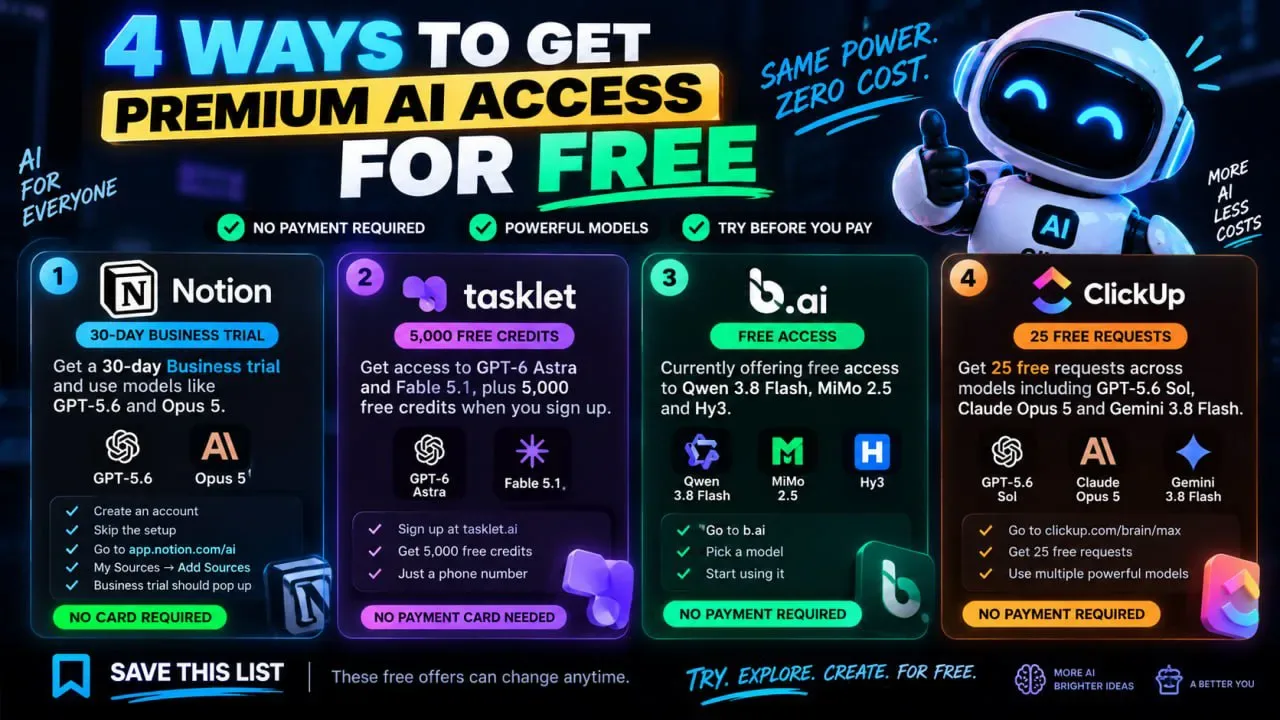
Looking for a way to test the newest AI models without paying for them? Four tools are currently handing out free trials and credits, and each one opens up a different set of models. The links below take you straight to the sign-up page for each.
That covers a 30-day Business trial on Notion, 5,000 free credits on Tasklet, and 25 free requests on ClickUp Brain Max. These are limited offers, so it pays to grab them while they last.
Tutorial
- Open https://app.notion.com/ai to start the 30-day Business trial. It runs on GPT-5.6 and Opus 5.
- Go to https://tasklet.ai/ to pick up 5,000 free credits. The models available there are GPT-6 Astra and Fable 5.1.
- Open https://b.ai/ to try BAI. It covers Qwen 3.8 Flash, MiMo 2.5 and Hy3, though the post does not say how many free credits come with it.
- Go to https://clickup.com/brain/max for 25 free requests. That one bundles GPT-5.6 Sol, Claude Opus 5 and Gemini 3.8 Flash.
Wrapping Up
Pick the tool whose models match what you are actually working on. Notion is the one to choose if you want the longest run at it, Tasklet if you need a big pile of credits to burn through, and ClickUp if you only want a quick test of a few prompts.
None of these offers is guaranteed to stay up, so claim the ones you want now rather than bookmarking them for later.
Does this still work?
Nobody's checked yet
Sign in to tell everyone how it went.
Continue with GoogleBe the first — one tap saves the next person an hour.
It takes 3 reports in 30 days to set the status.
More shares you might like
 AIHow to Get Free $200 Funds on Digital Ocean1y809 views
 AIHow to Claim 100M Free Tokens on CodeCraft API6d397 views
 NewsFree Domain Available at nic.eu.org1mo90 views
 How to Get Atomesus Prime Free for 1 Year1mo68 views
 How to Claim Google Gemini Student Package for Free3w89 views
 AIOpen Bot builds open-source AI coworkers with jobs and tools4d26 views
Comments
Join the conversation — sign in to comment.
No comments yet — start the conversation!